
Saved
Choose the name that will be shown in your Saved menu.
Done!
| Developer: | Thomas Tempelmann (2) | ||
| Price: | $8.00 | ||
| Score: | 8,550 Platinum | ||
| Rankings: | 0 | ||
| Comments: | 0 Add a comment | ||
| Lists: | 5 + 2 | ||
| Points: | 1 + 0 ¡ | ||
| +1 Points | |||
Description

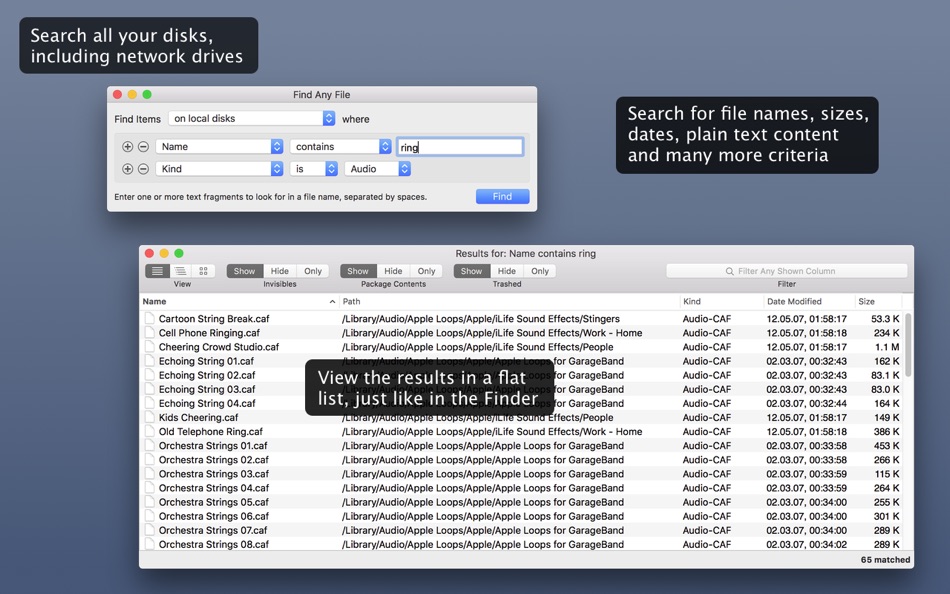
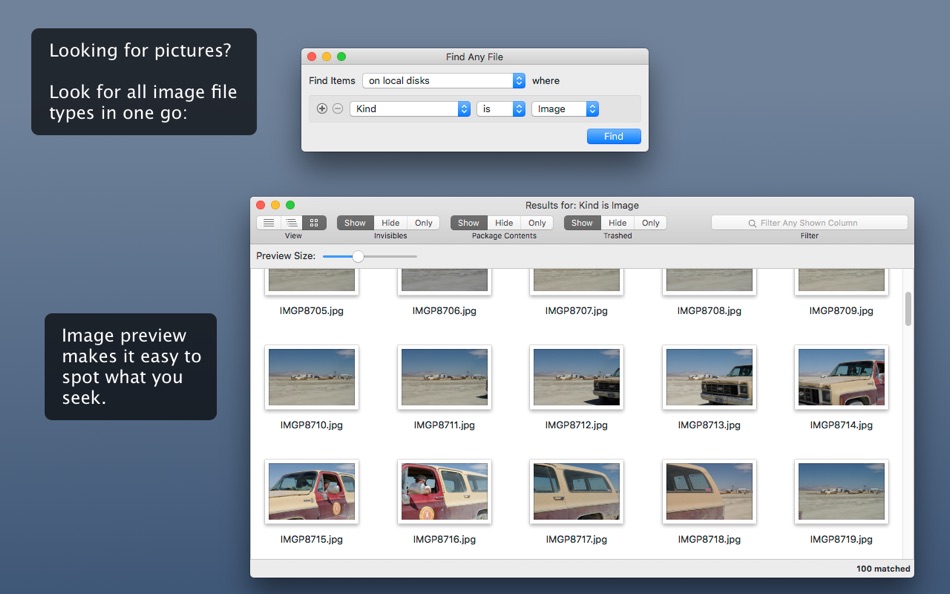
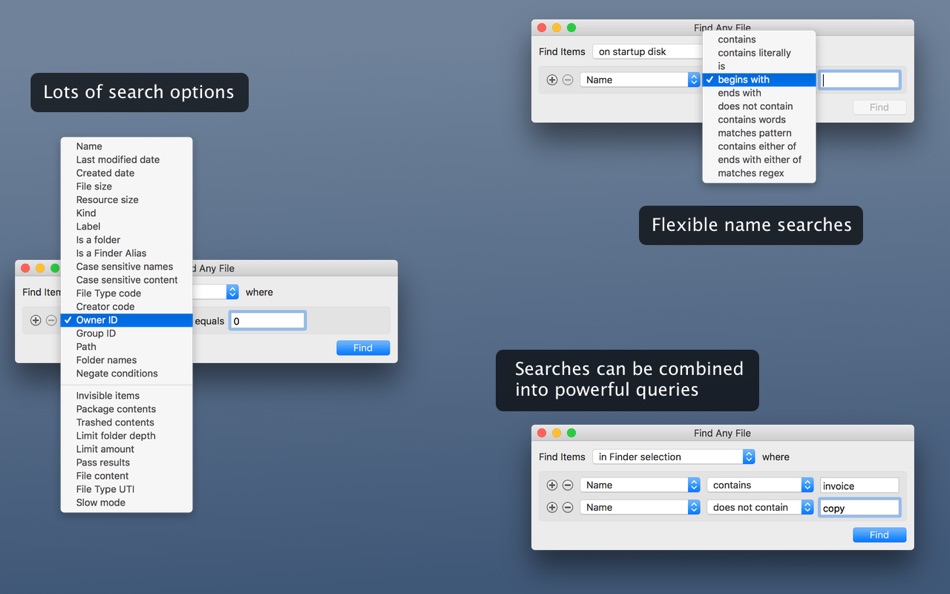
Unhappy with Spotlight because it does not find files that you know to be there? Use FAF to find every file on your disks, including those usually hidden. By file name, date, size, and even plain text content (including RTF, Word and Excel files, but not PDF files – see note below).
• Recover a file whose name you partially remember?
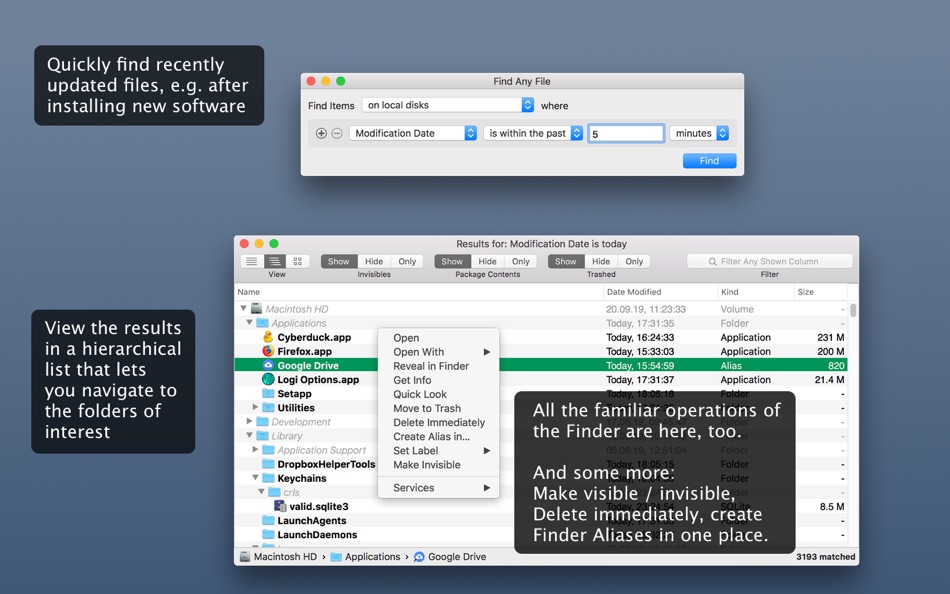
• See what files got changed in the past 5 minutes?
• Find all the largest files on your disk?
• Uninstall software that leaves files in hidden places where Spotlight doesn't look?
• Search with regular expressions?
Find Any File (FAF) is the perfect tool for these tasks.
You can even search on disks that are not indexed by Spotlight, including network server (NAS) volumes.
Find Any File can find files that Spotlight doesn't, e.g. those inside bundles and packages, and inside system folders that are usually excluded from Spotlight search.
Contrary to Spotlight, it does not use a database but instead searches the data on disk directly. This lets you search for file properties such as name, creation and modification dates, file size, even plain text inside files, but also makes it slightly slower. However, since FAF now includes Spotlight results where possible, you'll still get such results as quickly as with Spotlight search in Finder.
Another useful feature is its hierarchical results view (see screenshots). It lets you view the found items within their respective folders, making it often much easier to browse through 100s of found items.
•• Note about text search inside files ••
FAF can search file content only in plain (unformatted and RTF) and in zip-compressed text files (as used by Word and Excel for instance), and with less freedom than what Spotlight search offers in this regard. For instance, limit your search to single words, and use several "Text content" rules if you look for multiple words in a file. Also, while it's not as fast as Spotlight, it's still much faster than using Unix tools such as grep, because FAF uses all available CPUs for the search concurrently.
For finding text in PDF and other files that encode or compress the text in other formats, FAF can still find text in them, provided that Spotlight has indexed the files, because FAF includes Spotlight results by default.
•• Here's what users say about FAF ••
“FAF goes where Spotlight's can't easily reach.”
“As the administrator for about 50 school Macs, I often need to look for some file misplaced by a novice or, while troubleshooting a system, I often need to search for obscure operating system files. Find Any File is in my arsenal of tools when things files or folders go astray.”
“I use it when I want to find a specific kind of file or to see and eliminate or compare the double and redundant files. I surely use it 4-5 times a week.”
“I keep FAF as an icon in the toolbar of every Finder window. When I have to actually find something, I use FAF instead of the Finder.”
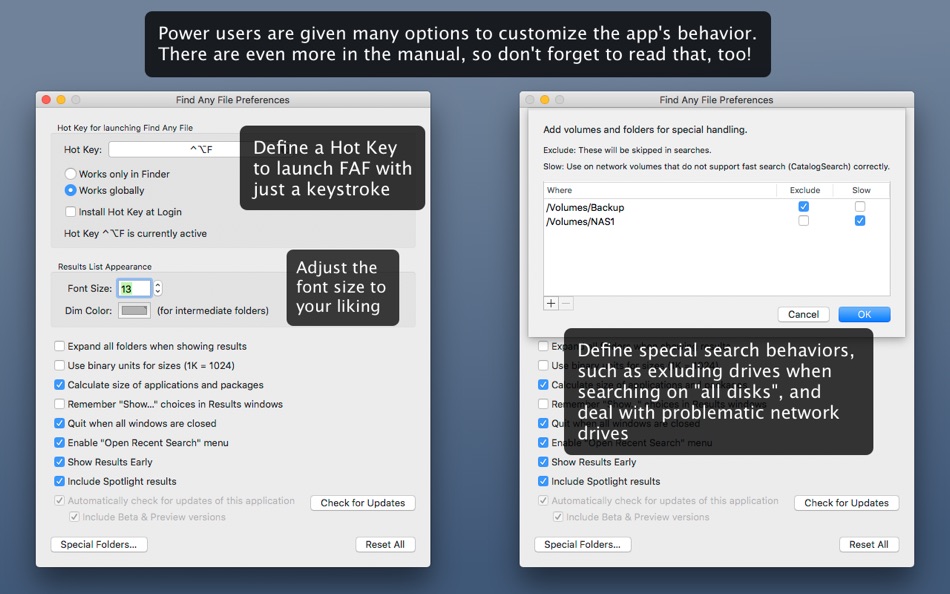
Screenshots


Ad
Price History
- Current price: $8.00
- Minimum: $2.99
- Maximum: $8.00
Track prices
AppAgg Score
8,550
Estimated AppAgg Score for
Find Any File (FAF)
8,550 Platinum
Higher scores usually mean stronger signals on AppAgg.
Based on: popularity · ratings · freshness · deals · store data · community signals
Recalculated daily using fresh AppAgg data.
Short URL: Copied!
What's new
- Version: 2.6.1
- Last Updated:
- • Double clicking the divider of a result list's header (where you can also drag-change the width of the column) now adjusts the column width automatically.
• Fixes loading of .paths files that contain the search info in JSON format.
• Fixes the rule "Calculate folder sizes" where it would show "-" for searched directories, especially when also including results from Spotlight.
• Fixes arranging of result columns that use "*" in their width fields, generated by FAF v1 or set manually.
• Fixes saving results in JSON format.
Additional Information
- Release Date:
- Category:
macOS Apps›Utilities - OS:
macOS,macOS 10.11 and up - Size:
10 Mb - Supported Languages:
English,French,German,Italian,Japanese,Portuguese,Spanish - Content Rating:
4+ - Mac App Store Rating:
0 - Website:
 https://findanyfile.app
Developer
- Thomas Tempelmann
- Platforms: macOS Apps (2)
- Lists: 5 + 2
- Points: 3 + 0 ¡
- Rankings: 0
- Comments: 0
- Deals: 0
- Videos: 0
- RSS: Subscribe
Lists (5)
- Find Any File (FAF)


Points (1)
-

- 80 Randall Bruder
- +1

Rankings (0)
0
Comments (0)
Be the first to comment
Summary
Find Any File (FAF) Short URL: Copied!- Share
- Mac App Store
«Find Any File (FAF)» is a Utilities app for macOS, developed by «Thomas Tempelmann». It was first released on and last updated on . The lowest historical price was $2.99 on , and the highest was $8.00 on . This app has not yet received any ratings on AppAgg. It has been added to 5 public lists and 2 private lists created by users. AppAgg has tracked 1 confirmed points plus 0 indirect points for this app. Available languages: English, French, German, Italian, Japanese, Portuguese, Spanish. AppAgg continuously tracks the price history, ratings, and user feedback for «Find Any File (FAF)». AppAgg does not host applications or distribute software. All trademarks, logos and screenshots belong to their respective owners. Subscribe to this app or follow its RSS feed to get notified about future deals or updates.
Similar
-
- Any File Info-EXIF&MEDIA Info
- macOS Apps: Utilities By: 奇鹏 于
- Free
- Lists: 0 + 1 0 0
- Points: 1 + 0 690 · Silver Version: 1.6.0 Any File Info is a professional tool to view and browse files information. It supports multiple types of files documents, images, audios and videos. Any File Info enables you to access
-
- Open Any File
- macOS Apps: Utilities By: Rocky Sand Studio Ltd.
- Free
- Lists: 3 + 2 0 0
- Points: 5 + 0 1K · Gold Version: 1.2.6 Open Any File shows compatible apps installed on your Mac and helps you to search on the web with the click of a button Open Any File also shows advanced information about your files: ...
-
- Search Any File
- macOS Apps: Utilities By: 仁超 张
- $2.99
- Lists: 0 + 1 0 0
- Points: 8 + 0 7K · Platinum Version: 5.5.5 Search Any File is a powerful file search tool designed to quickly find files stored on various storage devices. Whether your files are stored on a local hard drive, external storage ...
-
- Extract Any File
- macOS Apps: Utilities By: Pocket Bits LLC
- Free
- Lists: 0 + 1 0 0
- Points: 1 + 0 610 · Silver Version: 1.0 #1 FREE solution to unarchive ANY file 100% FOREVER FREE. No ads. No in-app purchases. FREE lifetime updates and support. NO MONTHLY FEES OR HIDDEN COSTS. Unzip, Unrar, Unarchive, ...
-
- Rocket Transfer - Any file
- macOS Apps: Utilities By: Shanghai Troll Technology Co., Ltd.
- * Free
- Lists: 0 + 1 0 0
- Points: 12 + 0 5K · Gold Version: 4.3.3 Rocket Transfer can help you quickly transfer data from other computers or mobile phones (iPhone/Android/Others) to macOS, just open this app on the macBook, then connect the same WiFi
- New
- Mugyu - Compress Any File
- macOS Apps: Utilities By: Takashi Fujisaki
- * Free
- Lists: 0 0 0
- Points: 0 + 0 600 · Silver Version: 1.0.2 Mugyu is an intuitive, easy-to-use compression app for Mac. Just drop your files to compress images, videos, PDFs, and audio all at once. The biggest frustration with compression apps ...
- -100% New
- File Date & Time Editor
- macOS Apps: Utilities By: Rodrigo Dutra de Oliveira
- ▼ Free
$9.99-100% - Lists: 0 + 1 0 0
- Points: 3 + 0 640 · Silver Version: 1.1 File Date & Time Editor is a native macOS utility for inspecting and batch-editing the creation and modification timestamps on any file or folder. Drop files or folders into the app ...
- New
- File Converter - Batch Convert
- macOS Apps: Utilities By: Singabe Djonouma
- * Free
- Lists: 0 0 0
- Points: 0 + 0 590 · Bronze Version: 1.0 File Converter is the fastest way to convert files on your Mac right from your menu bar. Drag and drop any image, video, or audio file and convert it instantly. Everything runs locally
-
- File Cabinet Pro
- macOS Apps: Utilities By: App Tyrant Corp
- $29.99
- Lists: 0 + 1 0 0
- Points: 4 + 0 7K · Platinum Version: 8.8.3 File Cabinet Pro is the file manager for the macOS menu bar. Quickly navigate to files without cluttering your desktop. Open, move, rename, compress, tag, trash, copy and paste files, ...
-
- File Vortex
- macOS Apps: Utilities By: Walter Tengler
- $3.99
- Lists: 0 0 0
- Points: 0 + 0 580 · Bronze Version: 1.3 File Vortex lives in your menu bar and turns file chaos into order. Drag photos, documents, and videos onto the floating vortex window they're instantly organized into date-based ...
-
- File Rename Pro
- macOS Apps: Utilities By: Gavin Matthews
- * $12.99
- Lists: 1 0 0
- Points: 1 + 0 930 · Silver Version: 2025.3 File Rename Pro lets you rename a number of files quickly and easily, saving you time and effort. Drag and drop one or more files or folders from Finder onto the app and you're ready ...
-
- Any-Make MP4 Converter
- macOS Apps: Utilities By: Tipard Studio
- * Free
- Lists: 0 + 1 0 0
- Points: 1 + 0 1K · Gold Version: 5.3.51 Any-Make MP4 Converter - a free tool that converts videos to MP4 quickly Looking for a free and powerful video conversion tool that can convert your favorite videos to MP4 format? Look
-
- File Fairy
- macOS Apps: Utilities By: David Lafortune
- Free
- Lists: 0 0 0
- Points: 1 + 0 580 · Bronze Version: 2.04 File Fairy is an intelligent macOS menu bar app that uses AI to automatically rename your downloads and screenshots. By analyzing file content including OCR for images and metadata for
-
- File Camouflage
- macOS Apps: Utilities By: 冬洋 梁
- $29.99
- Lists: 0 0 0
- Points: 0 + 0 580 · Bronze Version: 3.0.1 Do you have a secret files(photos,movies,document ) When save them on your computer,whether to worry about what others see or use them.When sent it by email,did you worried these files