
Zapisane
Wybierz nazwę, która będzie wyświetlana w menu Zapisane.
Gotowe!
| Programista: | Candy Bear Workstation (1) | ||
| Cena: | $5.33 | ||
| Ocena: | 500 Brąz | ||
| Rankingi: | 0 | ||
| Komentarze: | 0 Opublikuj komentarz | ||
| Listy: | 0 + 0 | ||
| Punkty: | 0 + 0 ¡ | ||
| +1 Punkty | |||
Opis

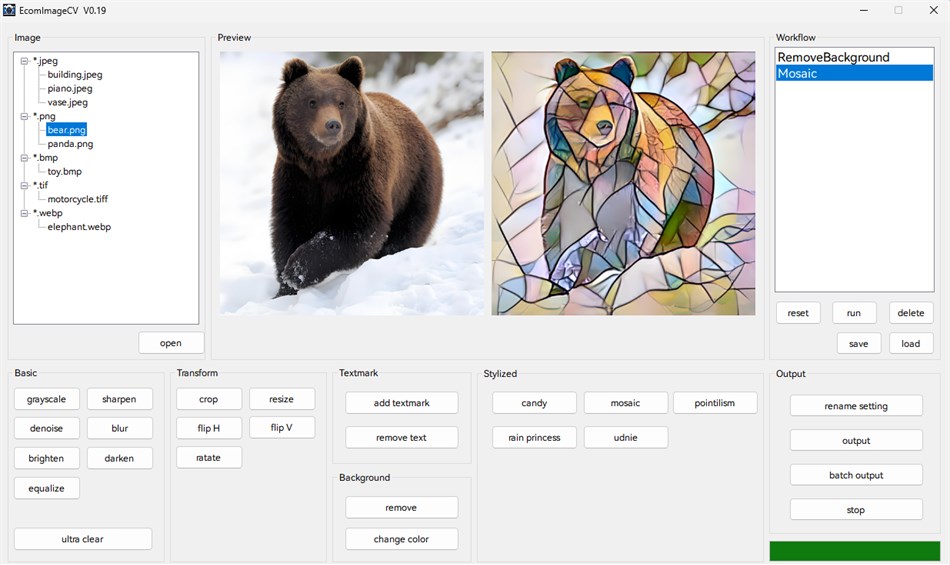
EcomImageCV is a powerful image processing software designed specifically for
e-commerce image processing. The software integrates multiple image processing
functions, including basic image processing, background removal, text removal,
image stylization, super resolution enhancement, and more. It supports batch
processing and workflow automation to help users efficiently complete image
processing tasks.
Key Features:
- Support for multiple image formats: JPEG, PNG, BMP, GIF, TIFF, WebP, TGA
- Intuitive graphical user interface
- Real-time preview functionality
- Batch processing support
- Workflow save and load
- AI-driven processing features such as super-resolution, text or object removal, background removal, Image style transformation.
2. Quick Start
2.1 Opening an Image
--------------------
- Click the "open" button to open an image file
- Supports drag-and-drop operation - drag image files directly into the software window
- Click a filename in the file list on the left to quickly switch images
2.2 Processing an Image
-----------------------
- Select the desired processing function from the function panel on the bottom, such as remove background, add textmark and so on.
- The processing result will be displayed in the preview area on the top
2.3 Saving an Processed Image
-------------------
- Click the "output" button to save a single processed image
- Select the output format (JPEG/PNG/BMP/TIFF/WebP)
- Output files will be saved in the "output" subfolder within the source file directory
2.4 Batch Image Processing
-------------------
- Click the "batch output" button to process all the image files in the source file directory, the processing will be based on the workflow on the right.
- Output files will be saved in the "output" subfolder within the source file directory
2.5 Example: Process images in batch: remove the background, add text watermarks, resize to 256x256, and change their format to png.
-------------------
- Click the "open" button to open an image file, all images that need to be processed should be placed in the same folder as this file.
- Click the "remove background" button to remove the image background.
- Click the "add textmark" button to add text watermark on image.
- Click the "resize" button to resize the image.
- Click the "batch output", choose the output format (PNG). Then all image files within the folder will be processed.
- Output files will be saved in the "output" subfolder within the source file directory.
For questions or suggestions, please contact the development team ( candybearws@163.com).
Thank you for using EcomImageCV!
Zrzuty ekranu
Ad
Historia cen
- Aktualna cena: $5.33
- Minimalna: $5.33
- Maksymalna: $5.33
Monitoruj ceny
Ocena AppAgg
500
Szacowana ocena AppAgg dla
EcomImageCV
500 Brąz
Wyższe oceny zwykle oznaczają silniejsze sygnały w AppAgg.
Na podstawie: popularności · ocen użytkowników · świeżości · okazji · danych sklepów · aktywności społeczności
Przeliczane codziennie na podstawie aktualnych danych AppAgg.
Krótki URL: Skopiowano!
Nowości
- Wersja: PC
- Ostatnia aktualizacja:
Dodatkowe informacje
- Data wydania:
- Kategoria:
Windows Aplikacje›Narzędzia programistyczne - System operacyjny:
PC - Rozmiar:
511 Mb - Obsługiwany język:
English - Ocena treści:
EVERYONE - Windows Store Ocena:
0
Programista
- Candy Bear Workstation
- Platformy: Windows Aplikacje (1)
- Listy: 0 + 0
- Punkty: 0 + 0 ¡
- Rankingi: 0
- Komentarze: 0
- Zniżki: 0
- Filmy: 0
- RSS: Subskrybuj
Listy (0)
0
- EcomImageCV
Punkty (0)
0
Rankingi (0)
0
Komentarze (0)
Skomentuj jako pierwszy
Krótko
EcomImageCV Krótki URL: Skopiowano!- Udostępnij
- Windows Store
«EcomImageCV». Platforma: Windows. Kategoria: Narzędzia programistyczne. Deweloper: «Candy Bear Workstation». Pierwsze wydanie: . Ostatnia aktualizacja: . Aktualna cena: $5.33. Najniższa zarejestrowana cena: $5.33. Najwyższa odnotowana cena: $5.33. Ten tytuł nie otrzymał jeszcze ocen ani recenzji w serwisie AppAgg. Dostępne języki: English. AppAgg śledzi historię cen, oceny i opinie użytkowników «EcomImageCV». AppAgg nie hostuje aplikacji ani nie dystrybuuje oprogramowania. Wszystkie znaki towarowe, logo i zrzuty ekranu należą do ich odpowiednich właścicieli. Śledź przyszłe rabaty i aktualizacje za pośrednictwem RSS
Podobne
-
- Windows Terminal
- Windows Aplikacje: Narzędzia programistyczne Przez: Microsoft Corporation
- Bezpłatny
- Listy: 7 + 3 0 0
- Punkty: 5 + 9,450 10K Wersja: PC The Windows Terminal is a modern, fast, efficient, powerful, and productive terminal application for users of command-line tools and shells like Command Prompt, PowerShell, and WSL. ... ⥯
-
- App Installer (Mobile) - WinUI 3
- Windows Aplikacje: Narzędzia programistyczne Przez: wherewhere
- Bezpłatny
- Listy: 3 + 2 0 0
- Punkty: 20 + 3,246 8K Wersja: PC Android™ App Installer for Windows 10/11 makes sideloading Android applications easy for WSA, Anbox, etc.: Just double-click the app package, and you won't have to run Android Debug ... ⥯
-
- Arduino IDE
- Windows Aplikacje: Narzędzia programistyczne Przez: Arduino LLC
- Bezpłatny
- Listy: 0 + 2 0 0
- Punkty: 2 + 926 4K Wersja: PC Arduino is an open-source electronics platform based on easy-to-use hardware and software. It's intended for anyone making interactive projects. IMPORTANT: This app performs with core ... ⥯
-
- Ubuntu on Windows
- Windows Aplikacje: Narzędzia programistyczne Przez: Canonical Group Limited
- Bezpłatny
- Listy: 2 0 0
- Punkty: 11 + 912 5K Wersja: PC Ubuntu on Windows allows you to use Ubuntu Terminal and run Ubuntu command line utilities including bash, ssh, git, apt and many more. Please note that Windows 10 S does not support ... ⥯
-
- DevToys
- Windows Aplikacje: Narzędzia programistyczne Przez: etiennebaudoux
- Bezpłatny
- Listy: 3 + 1 0 0
- Punkty: 5 + 677 7K Wersja: PC An Open-Source Swiss Army knife for developers. DevToys helps in everyday tasks like formatting JSON, comparing text, testing RegExp. No need to use many untruthful websites to do ... ⥯
-
- Termius - Modern SSH Client
- Windows Aplikacje: Narzędzia programistyczne Przez: Termius Corporation
- * Bezpłatny
- Listy: 0 + 4 0 0
- Punkty: 8 + 540 38K Wersja: PC Termius is a modern SSH client designed for productivity and collaboration. Connect with one click from desktop and mobile no re-entering IP addresses, ports, and passwords. With a ... ⥯
-
- TurboWarp
- Windows Aplikacje: Narzędzia programistyczne Przez: Thomas Weber
- Bezpłatny
- Listy: 0 0 0
- Punkty: 1 + 539 6K Wersja: PC TurboWarp is a mod of the Scratch programming language with a compiler to run projects faster, dark mode, new extensions, a bunch of addons, and more. - Runs projects up to 100x faster ⥯
-
- Python 3.12
- Windows Aplikacje: Narzędzia programistyczne Przez: Python Software Foundation
- Bezpłatny
- Listy: 0 0 0
- Punkty: 1 + 412 4K Wersja: PC Python is an easy to learn, powerful programming language. It has efficient high-level data structures and a simple but effective approach to object-oriented programming. Python s ... ⥯