
ที่บันทึกไว้
เลือกชื่อที่จะแสดงในเมนูที่บันทึกไว้ของคุณ
เสร็จแล้ว
| ผู้พัฒนา: | Mineko IMANISHI (4) | ||
| ราคา: | * ฟรี | ||
| การจัดอันดับ: | 0 | ||
| ความเห็น: | 0 โพสต์ความคิดเห็น | ||
| รายการ: | 3 + 4 | ||
| แต้มแล: | 8 + 0 ¡ | ||
| Mac App Store | |||
คำอธิบาย

Just For Mac
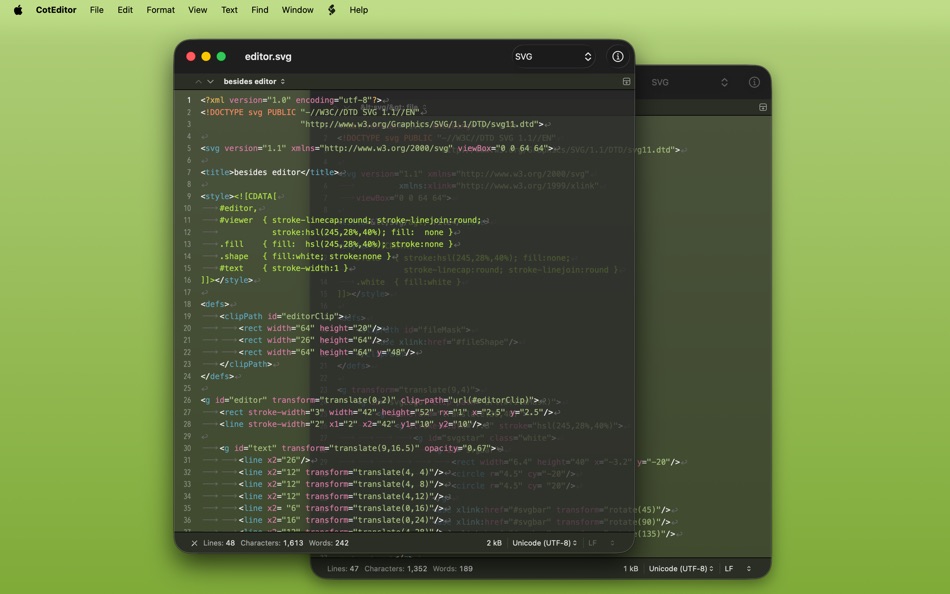
The application is exactly made for macOS. CotEditor looks and behaves just as macOS applications should. It means, you already know how to use it even on the first launch. There are no complicated setting files that require geek knowledge so that you can access all your settings including syntax definitions and themes from a standard settings window.
Quick, Easy, and Powerful
CotEditor launches so quickly that you can write your text immediately when you want to. It's perfect for you to write a draft version of your document or a scratch code. The simply organized user interface doesn't disturb your task. However, at the same time, CotEditor is neither software only for beginners nor a typical minimal “zen-style” editor. It is fully customizable. There are, of course, syntax highlighting for various languages, find and replace with the regular expression, auto-indentation, command-line tool, and lots of other deep functions. You can also easily write your own macro in your favorite languages.
Key Features
• Syntax highlighting including more than 50 preset languages
• Powerful find and replace with the regular expression
• Auto-backup with/without overwriting actual document files
• Line numbers view
• Live character/word/line count
• Handling file encoding and line endings with care
• Auto-generated outline menu for fast navigation
• Character inspector that shows the zoomed glyph and Unicode information
• Vertical text layout mode
• Various Unicode normalizations
• Semi-transparent window
• Command-line tool
• Scriptable with your favorite language
• CJK-languages friendly
Terms of Service: https://www.apple.com/legal/internet-services/itunes/dev/stdeula/
Privacy Policy: https://coteditor.com/privacy
Ad
ภาพหน้าจอ



ประวัติราคา
-
* การซื้อภายในแอพ - วันนี้: ฟรี
- ต่ำสุด: ฟรี
- มากที่สุด: ฟรี
ติดตามราคา
มีอะไรใหม่
- เวอร์ชัน: 6.2.6
- อัปเดต:
- Improvements
- Improve stability on MacBook Pro models with Touch Bar.
Fixes
- Fix a crash on exporting settings when some setting values are not customized.
- Fix a potential crash in Find All when a matched line is extremely long.
- Address a potential crash when editing a keyboard shortcut in the snippets settings.
ข้อมูลเพิ่มเติม
- วันที่วางจำหน่าย:
- หมวดหมู่:
macOS แอป›ประสิทธิภาพการผลิต - ระบบปฏิบัติการ:
macOS,macOS 15.0 และสูงกว่า - ขนาด:
12 Mb - ภาษาที่สนับสนุน:
Chinese,Czech,Dutch,English,French,German,Italian,Japanese,Korean,Polish,Portuguese,Russian,Spanish,Turkish - การจัดประเภทเนื้อหา:
4+ - Mac App Store คะแนนโดย:
0 - เว็บไซท์:
 https://coteditor.com
ผู้พัฒนา
- Mineko IMANISHI
- แพลตฟอร์ม: macOS แอป (4)
- รายการ: 3 + 4
- แต้มแล: 21 + 0 ¡
- การจัดอันดับ: 0
- ความเห็น: 0
- ลดราคา: 0
- วิดีโอ: 0
- RSS: ติดตาม
รายการ (3)
- CotEditor



แต้มแล (8)
-

- 103 윤대남
- +1
-
- 474 QenTox
- +1
-
- 61 FUKASHI NOBE
- +1
-
- 1 Dr MHQ
- +1
-
- 65 Kai Lee
- +1
-
- 3 Steven Liou
- +1




การจัดอันดับ (0)
0 ☹️
ความเห็น (0)
เป็นคนแรกที่แสดงความเห็น 🌟
«CotEditor». แพลตฟอร์ม: macOS. หมวดหมู่: ประสิทธิภาพการผลิต. ผู้พัฒนา: «Mineko IMANISHI». การเปิดตัวครั้งแรก: . อัปเดตล่าสุด: . ราคาปัจจุบัน: ฟรี. ชื่อนี้ยังไม่ได้รับการให้คะแนนหรือบทวิจารณ์บน AppAgg รายการ: สาธารณะ 3, ส่วนตัว 4. จุดที่ติดตาม: ยืนยันแล้ว 8, ทางอ้อม 0. ภาษาที่ใช้ได้: Chinese, Czech, Dutch, English, French, German, Italian, Japanese, Korean, Polish, Portuguese, Russian, Spanish, Turkish. AppAgg ติดตามประวัติราคา การให้คะแนน และคำติชมของผู้ใช้ «CotEditor». ส่วนลดและอัปเดตในอนาคต: RSS. AppAgg ไม่ได้โฮสต์แอปพลิเคชันหรือแจกจ่ายซอฟต์แวร์ เครื่องหมายการค้า โลโก้ และภาพหน้าจอทั้งหมดเป็นของเจ้าของที่เกี่ยวข้อง
CotEditor URL แบบสั้น: คัดลอกแล้ว!- 🌟 แชร์
- Mac App Store
คล้ายกัน
-
- Foxit PDF Editor: Convert&Sign
- macOS แอป: ประสิทธิภาพการผลิต โดย: FOXIT SOFTWARE INCORPORATED
- * ฟรี
- รายการ: 0 + 1 0 0
- แต้มแล: 0 + 0 เวอร์ชัน: 2026.1.0 Foxit PDF Editor is an AI-integrated PDF solution that innovates your way to work intelligently with PDF files. This easy-to-use PDF editor allows you to view and annotate PDFs for ... ⥯
-
- Textbundle Editor
- macOS แอป: ประสิทธิภาพการผลิต โดย: Xelaton Software
- $1.99
- รายการ: 0 + 0 0 0
- แต้มแล: 0 + 0 เวอร์ชัน: 1.2.2 With "Textbundle Editor" you can quickly and easily open, edit and create new Textbundle- and Textpack-files. # Customize your Editor It is completely up to you what the text editor ... ⥯
-
- Document Editor: Edit Docs
- macOS แอป: ประสิทธิภาพการผลิต โดย: Muhammad Ishfaq
- * ฟรี
- รายการ: 0 + 1 0 0
- แต้มแล: 0 + 0 เวอร์ชัน: 1.0 Comprehensive Desktop Document Editor This professional desktop application provides a complete set of tools for creating, refining, and managing your documents. It combines a ... ⥯
- ใหม่
- Document Editor Files
- macOS แอป: ประสิทธิภาพการผลิต โดย: Asfand Ali Ghafoor
- * ฟรี
- รายการ: 0 + 0 0 0
- แต้มแล: 0 + 0 เวอร์ชัน: 1.1 A Docs Editor is a powerful tool designed to help users create, edit, and manage written documents efficiently in a digital environment. It provides a clean and organized workspace ... ⥯
-
- SingAccord Song Editor
- macOS แอป: ประสิทธิภาพการผลิต โดย: Sing Accord LLC
- ฟรี
- รายการ: 0 + 0 0 0
- แต้มแล: 1 + 0 เวอร์ชัน: 1.2.0 While worship leaders use the SingAccord app, it has no ability to edit MusicXML files once they import a song, other than basic section re-ordering. So composers, publishers and ... ⥯
-
- tibok markdown editor
- macOS แอป: ประสิทธิภาพการผลิต โดย: Kristina Quinones
- ฟรี
- รายการ: 0 + 0 0 0
- แต้มแล: 0 + 0 เวอร์ชัน: 1.0 Tibok is a markdown editor designed for developers, writers, and anyone who values simplicity and power in their writing tools. Why Tibok? Workspace Organization - Manage entire ... ⥯
-
- PDF Editor : Converter & Sign
- macOS แอป: ประสิทธิภาพการผลิต โดย: Muhammad Farooq
- * ฟรี
- รายการ: 0 + 0 0 0
- แต้มแล: 0 + 0 เวอร์ชัน: 1.2 Ultimate PDF Toolkit Convert, Edit, Merge & Conversions Turn your files into professional PDFs in seconds! Ultimate PDF Toolkit is your all-in-one PDF solution, offering fast file ... ⥯
-
- LFF JSON Editor
- macOS แอป: ประสิทธิภาพการผลิต โดย: 斌 虞
- ฟรี
- รายการ: 1 + 1 0 0
- แต้มแล: 8 + 0 เวอร์ชัน: 1.2.25 The ultra small JSON and Plist editor. There's a JSON editor embedded in Lifofinn code editor years, that allows user fast and visually edit JSON file or text block with tree ... ⥯
-
- Notepad - Text Editor
- macOS แอป: ประสิทธิภาพการผลิต โดย: 长江 吴
- * ฟรี
- รายการ: 0 + 1 0 0
- แต้มแล: 9 + 0 เวอร์ชัน: 2.3 This is a basic text editor. No formatting, styles, graphics, or unnecessary frills. Get it now and avoid all those text formatting headaches! Also, do you need to remember something ... ⥯
-
- Plain Text Editor Pro
- macOS แอป: ประสิทธิภาพการผลิต โดย: 远腾 李
- $4.99
- รายการ: 0 + 1 0 0
- แต้มแล: 9 + 0 เวอร์ชัน: 6.6.6 Plain Text Editor Pro is a minimalist text editor designed for speed, clarity, and distraction-free writing. Whether you re jotting down notes, editing code, or cleaning up copied ... ⥯
-
- CDR Editor: for CorelDRAW
- macOS แอป: ประสิทธิภาพการผลิต โดย: 士通 陈
- * ฟรี
- รายการ: 0 + 0 0 0
- แต้มแล: 0 + 0 เวอร์ชัน: 2.1.12 View, edit, print, convert CorelDRAW(.cdr/.cmx) files to PDF, JPG, PNG, WEBP, HEIC(iPhone Image), APNG/WEBP(Animation), MS Office Word, PowerPoint and Publisher. CDR Editor - view, ... ⥯
-
- Docx Editor - Word Processor
- macOS แอป: ประสิทธิภาพการผลิต โดย: 洪 陈
- * ฟรี
- รายการ: 0 + 1 0 0
- แต้มแล: 7 + 0 เวอร์ชัน: 3.1.0 Docx Editor is a cute, quick, fully functional and easy-to-use Word Processor for your daily work and personal needs. As a full-featured word processor, Docx Editor lets you create ... ⥯
-
- Screenshot Editor
- macOS แอป: ประสิทธิภาพการผลิต โดย: 科 姚
- $4.99
- รายการ: 0 + 0 0 0
- แต้มแล: 0 + 0 เวอร์ชัน: 2.3 Screenshot Editor helps you to easily take screenshot and annotate the screenshot with a set of useful markup tools. Quickly take a screenshot with useful capturing modes: - Capture ... ⥯
-
- Tiny PDF Editor - PDF Signer
- macOS แอป: ประสิทธิภาพการผลิต โดย: 蒙蒙 贺
- ฟรี
- รายการ: 0 + 0 0 0
- แต้มแล: 0 + 0 เวอร์ชัน: 1.3.7 Tiny PDF Editor - Great for filling out scanned versions of pdf forms and signing pdf agreements and contracts. What users say? "It s the best way to insert an image of a signature, ... ⥯