
ที่บันทึกไว้
เลือกชื่อที่จะแสดงในเมนูที่บันทึกไว้ของคุณ
เสร็จแล้ว
| ผู้พัฒนา: | Sascha Simon (28) | ||
| ราคา: | $0.99 | ||
| การจัดอันดับ: | 0 | ||
| ความเห็น: | 0 โพสต์ความคิดเห็น | ||
| รายการ: | 1 + 2 | ||
| แต้มแล: | 9 + 0 ¡ | ||
| Mac App Store | |||
คำอธิบาย

Information:
• System Information
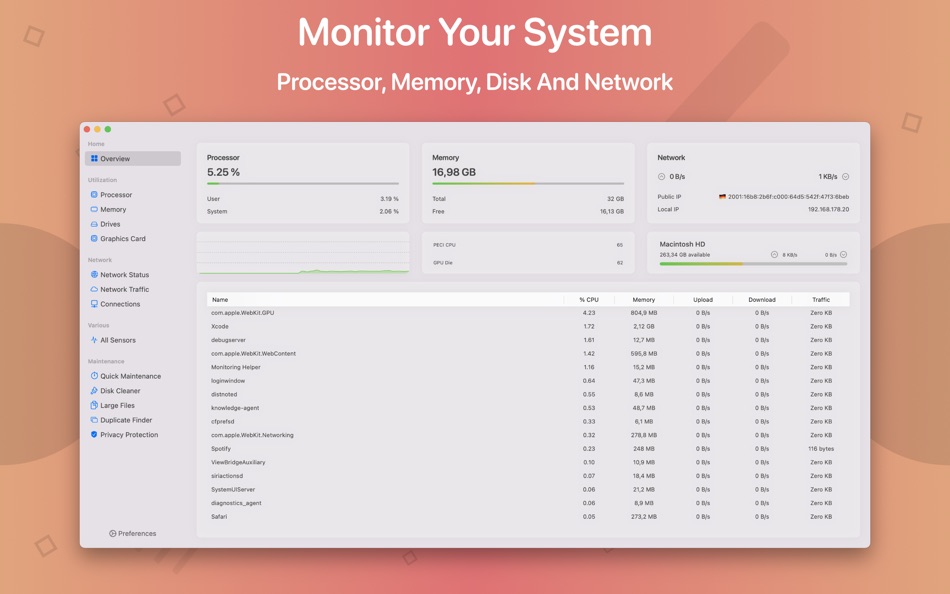
Keep track of all your system loads. This includes CPU load, memory usage, network speeds and -traffic and the open network connections. All information can be shown in both the menu bar extra and the overlay window. Use the Dashboard to take a look at the most important parameters.
• Menu Bar Extra
You can add as many menu bar widgets as you like. Every menu bar widget can be configured to show information.
• Info Panel
The info panel shows the most important information in a separate window.
• Bluetooth Device Battery Levels
The System Toolkit shows the battery levels of Bluetooth devices.
System Toolkit supports Apple peripherals, Apple Audio devices like AirPods and all Beats Earphones.
• Battery Information
You can check the battery parameters on the battery page. This page shows detailed information about the internal battery. If you are using a Mac without battery, this page is hidden.
Besides the information pages, the System Toolkit also offers the following maintenance features:
• Fast Maintenance: Clean your Mac System with a single click!
• Disk Cleaner
The disk cleaner searches your entire hard disk for temporary or cached files that can be deleted to free up some disk space. The categories include application- and user cache, developer cache, browser cache and many more caches.
• Duplicate Finder
Find duplicate files on your system. Use the smart selection to quickly select and delete your duplicate files and free up disk space.
• Big Files Finder
This feature allows you to find big files on your hard disk. Quickly see which files take the most space. The files can be deleted from within the app.
• Privacy Protector
Erase all your private data on your system. Did you visit some website that you do not want your other system users to find out about? Just start the Privacy Protector and erase your footsteps - it cleans the data of all major Web Browsers.
• App Cleaner
Use the App Cleaner to find and remove files that were created and are being used by an app.
The app icon was designed by Hugo Santos. You can check out his portfolio here:
https://sites.google.com/view/guerreirodosantos/início?authuser=0
Find other great apps on my homepage:
https://www.sascha-simon.com
http://contact.sascha-simon.com
If you like this app, please leave a positive rating. Positive ratings help others find the app and also is a great motivator for me to further develop the app.
Ad
ภาพหน้าจอ


ประวัติราคา
- วันนี้: $0.99
- ต่ำสุด: ฟรี
- มากที่สุด: $3.99
ติดตามราคา
มีอะไรใหม่
- เวอร์ชัน: 6.2.0
- อัปเดต:
- This update contains a brand new app icon designed by Hugo Santos.
ข้อมูลเพิ่มเติม
 https://sascha-simon.com/en/system-toolkit.html
ผู้พัฒนา
รายการ (1)
- System Toolkit

แต้มแล (9)




การจัดอันดับ (0)
0 ☹️
ความเห็น (0)
เป็นคนแรกที่แสดงความเห็น 🌟
«System Toolkit». แพลตฟอร์ม: macOS. หมวดหมู่: ยูทิลิตี้. ผู้พัฒนา: «Sascha Simon». การเปิดตัวครั้งแรก: . อัปเดตล่าสุด: . ราคาปัจจุบัน: $0.99. ราคาต่ำสุดที่บันทึกไว้: $0.00 (). ราคาสูงสุดที่บันทึกไว้: $3.99 (). ชื่อนี้ยังไม่ได้รับการให้คะแนนหรือบทวิจารณ์บน AppAgg รายการ: สาธารณะ 1, ส่วนตัว 2. จุดที่ติดตาม: ยืนยันแล้ว 9, ทางอ้อม 0. ภาษาที่ใช้ได้: English, German. AppAgg ติดตามประวัติราคา การให้คะแนน และคำติชมของผู้ใช้ «System Toolkit». ส่วนลดและอัปเดตในอนาคต: RSS. AppAgg ไม่ได้โฮสต์แอปพลิเคชันหรือแจกจ่ายซอฟต์แวร์ เครื่องหมายการค้า โลโก้ และภาพหน้าจอทั้งหมดเป็นของเจ้าของที่เกี่ยวข้อง
System Toolkit URL แบบสั้น: คัดลอกแล้ว!- 🌟 แชร์
- Mac App Store
คล้ายกัน
-
- System Toolkit Pro
- macOS แอป: ยูทิลิตี้ โดย: Sascha Simon
- $4.99
- รายการ: 0 + 1 0 0
- แต้มแล: 1 + 0 เวอร์ชัน: 2.2.1 The System Toolkit Pro is an all-in-one information and maintenance app designed for macOS. Information: System Information Keep track of all your system loads. This includes CPU load, ⥯
-
- System-i NetworkTest
- macOS แอป: ยูทิลิตี้ โดย: System-i snc
- ฟรี
- รายการ: 0 + 0 0 0
- แต้มแล: 0 + 0 เวอร์ชัน: 2026.4.1 Easy to use (and totally free) internet connection checking app! HOW IT WORKS NetworkTest simply does a lot of pings to your gateway and to an external and indipendent server. At the ... ⥯
-
- System Monitor Premium
- macOS แอป: ยูทิลิตี้ โดย: Mehmet Sami Aslangil
- $2.99
- รายการ: 0 + 0 0 0
- แต้มแล: 0 + 0 เวอร์ชัน: 1.0 System Monitor Premium - Comprehensive real-time system performance monitoring for macOS. Track CPU, memory, disk, network, temperature, and battery health with precision. KEY ... ⥯
-
- system-monitor
- macOS แอป: ยูทิลิตี้ โดย: Thomas Leterme
- ฟรี
- รายการ: 0 + 0 0 0
- แต้มแล: 0 + 0 เวอร์ชัน: 2.0 Une application de monitoring system ⥯
- Ad
-
- System Insights
- macOS แอป: ยูทิลิตี้ โดย: ATHANASIOS CHONIAS
- * ฟรี
- รายการ: 0 + 2 0 0
- แต้มแล: 1 + 0 เวอร์ชัน: 1.1.0 System Insights is Activity Monitor reimagined as a gorgeous, native SwiftUI dashboard with historical analytics and a menu bar companion. REAL-TIME MONITORING Track your Mac's ... ⥯
-
- System Monitor
- macOS แอป: ยูทิลิตี้ โดย: Marcel Bresink Software-Systeme
- $4.99
- รายการ: 0 + 1 0 0
- แต้มแล: 1 + 0 เวอร์ชัน: 6.5 System Monitor is an application for the menu bar of your Mac, designed to inform you unobtrusively about the activity of your computer. You can retrieve up-to-date technical data any ... ⥯
-
- System Cleaner - Disk Cleanup
- macOS แอป: ยูทิลิตี้ โดย: Wise Tech Labs Private Limited
- $9.99
- รายการ: 0 + 0 0 0
- แต้มแล: 1 + 0 เวอร์ชัน: 2.1 System Cleaner is a brand new professional System utility app to keeping your Mac clean, healthy and optimized. Our latest app, System Cleaner, has been built with love for helping you ⥯
-
- System Indicators
- macOS แอป: ยูทิลิตี้ โดย: Binarycraft Pty Ltd
- $1.99
- รายการ: 0 + 0 0 0
- แต้มแล: 1 + 0 เวอร์ชัน: 1.13 System indicators is a lightweight monitoring tool that resides on OS X menubar. It provides a glimpse of the current system status including CPU, RAM, disks, network and ... ⥯
-
- System Data Cleaner
- macOS แอป: ยูทิลิตี้ โดย: Behlulcan Sahin
- $2.99
- รายการ: 0 + 0 0 0
- แต้มแล: 0 + 0 เวอร์ชัน: 1.2 System Data Cleaner Free Up Space from System Data! Is your System Data folder taking up too much space? Say goodbye to bloated storage! Find & Remove Cache Files Quickly scan and ... ⥯
-
- System Guardian
- macOS แอป: ยูทิลิตี้ โดย: Mantvydas Vaitkaitis
- $4.99
- รายการ: 0 + 0 0 0
- แต้มแล: 0 + 0 เวอร์ชัน: 1.0.1 System Guardian is a professional menu bar system monitor for CPU, GPU, memory, swap, and processes, with local alerts and real-time resource diagnostics. Built for resource-intensive ... ⥯
-
- System utility. monitor status
- macOS แอป: ยูทิลิตี้ โดย: luca calciano
- $2.99
- รายการ: 0 + 0 0 0
- แต้มแล: 0 + 0 เวอร์ชัน: 2.4 System Utility is the new app that allows you to keep everything under control! Optimize the status of your mac with this app! Take 100% advantage of your Mac s power. ⥯
- ใหม่
- System Gauge
- macOS แอป: ยูทิลิตี้ โดย: Noel Geren
- $4.99
- รายการ: 0 + 0 0 0
- แต้มแล: 0 + 0 เวอร์ชัน: 1.0 Your Mac's vitals, living on your desktop. System Gauge is a set of beautifully crafted desktop widgets that display real-time system stats (CPU, memory, network, disk, battery, ... ⥯
-
- System Stamp
- macOS แอป: ยูทิลิตี้ โดย: Ten by Ten
- $2.99
- รายการ: 0 + 0 0 0
- แต้มแล: 0 + 0 เวอร์ชัน: 1.9.0 Stamp your desktop with essential system information! System Stamp will apply information such as host name, operating system version, memory, and processor configuration onto your ... ⥯
-
- System Stats Pro for Menu Bar
- macOS แอป: ยูทิลิตี้ โดย: Jose Antonio Jimenez Campos
- $3.99
- รายการ: 0 + 0 0 0
- แต้มแล: 0 + 0 เวอร์ชัน: 2.2 This is an advanced system monitor for your Mac. SympleStats uses your menubar to show relevant information about your system, and windows to show additional information. It can show ... ⥯