
รายการโปรด
เลือกชื่อที่จะแสดงในเมนูรายการโปรดของคุณ
เสร็จแล้ว
| ผู้พัฒนา: | 秀英 朱 (13) | ||
| ราคา: | $9.99 | ||
| การจัดอันดับ: | 0 | ||
| ความเห็น: | 0 โพสต์ความคิดเห็น | ||
| รายการ: | 1 + 2 | ||
| แต้มแล: | 13 + 0 ¡ | ||
| Mac App Store | |||
คำอธิบาย

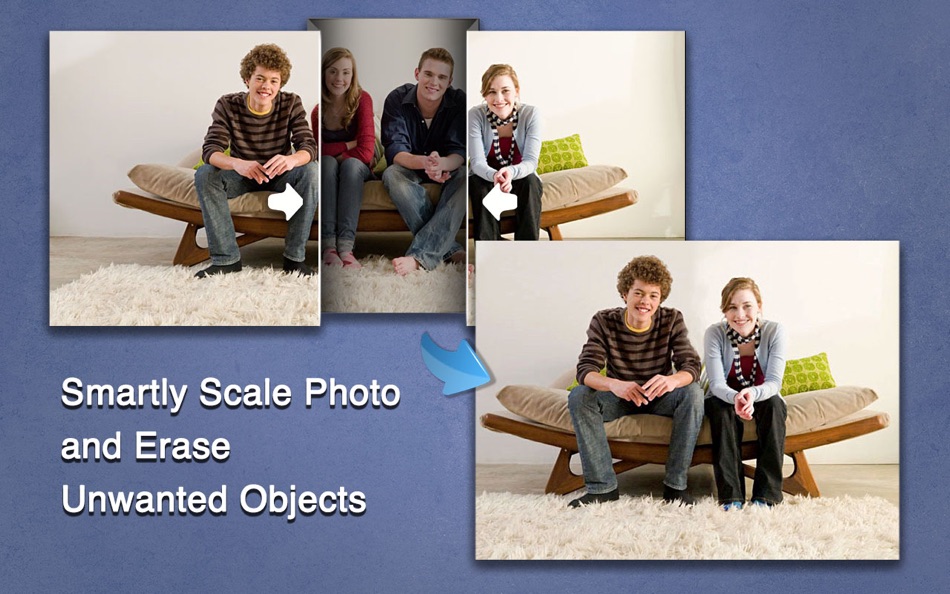
Super Eraser Pro is a powerful image processing software to erase unwanted objects, scale, denoise and remove haze for images. Super Eraser Pro magically scales an image or removes unwanted elements such as watermark, date, people, building, etc. without changing important visual content. Powered by the latest revolutionary image restoration algorithm, Super Eraser Pro only affects pixels in areas outside of the important visual content without sacrificing quality. A variety of experiments showed that Super Eraser Pro would give you better, more natural and more amazing results than any similar tool.
Key Features:
- Scale Images Smartly:
Super Eraser Pro shrinks or enlarges images to improve a composition avoiding distortion of the important parts of the image. It also can be used to remove portion of the image in a consistent way.
- Erase Unwanted Objects from Photo:
Super Eraser Pro has the ability to handle complex scenes or irregular shaped hole with highly textured objects and reconstruct missing or damaged patch from pixels around the selection to create a seamless repair of an image.
1 Remove watermark, logo, signature, date stamp, text etc.
2 Delete unwanted objects, such as wires, buildings, garbage bins, etc.
3 Erase skin blemishes, acnes ...
4 Get rid of image objects, pedestrians, tourists.
- Photo Noise Reduction
Using the State-of-art Denoising Technology in the industry, Super Eraser Pro reduces low light and high ISO noise in digital camera shots, tablets and smartphones (iPad, iPhone, Galaxy, HTC). Perfect tool for handling grainy and underexposed digital photos.
- Haze Removal: instantly remove haze from photo to achieve a clear vision.
- Very Fast Speed: Get the magical images done in seconds-to-minutes instead of minutes-to-hours.
- Intuitive User Interface: Simple operation. Easy to use and completely non-technical. Just select the Brush to mark unwanted objects with red color, Super Eraser Pro will do the rest for you.
- Live Preview: Instantly preview effect and make necessary revisions. Redo immediately if you are dissatisfied with the result.
- Supports all popular image formats: JPG, PNG, GIF, BMP, TIFF ...
Get the amazing software for fixing your photos NOW!
Feedback:
Any suggestion will be appreciated, support email: market@effectmatrix.com
Ad
ภาพหน้าจอ


ประวัติราคา
- วันนี้: $9.99
- ต่ำสุด: ฟรี
- มากที่สุด: $19.99
ติดตามราคา
มีอะไรใหม่
- เวอร์ชัน: 2.5.1
- อัปเดต:
- * Fixed bugs on 10.14 Mojave.
* Upgrade to "Super PhotoCut" - a great photo Background Eraser. 50% OFF.
ข้อมูลเพิ่มเติม
- วันที่วางจำหน่าย:
- หมวดหมู่:
macOS แอป›การถ่ายภาพ - ระบบปฏิบัติการ:
macOS,macOS 10.7 และสูงกว่า - ขนาด:
20 Mb - ภาษาที่สนับสนุน:
English - การจัดประเภทเนื้อหา:
4+ - Mac App Store คะแนนโดย:
0
 http://www.effectmatrix.com/mac-appstore/photo-eraser-pro-for-mac.htm
ผู้พัฒนา

แต้มแล (13)
-

- 920 thamer mohammed
- +1
-
- 14 Kevin Lee
- +1
-
- 39 Mick1234
- +1
-
- 474 QenTox
- +1
-
- 1,190 Anthony
- +1
-
- 1,141 Johonson
- +1




การจัดอันดับ (0)
0 ☹️
ความเห็น (0)
เป็นคนแรกที่แสดงความเห็น 🌟
«Super Eraser Pro:Photo Inpaint». แพลตฟอร์ม: macOS. หมวดหมู่: การถ่ายภาพ. ผู้พัฒนา: «秀英 朱». การเปิดตัวครั้งแรก: . อัปเดตล่าสุด: . ราคาปัจจุบัน: $9.99. ราคาต่ำสุดที่บันทึกไว้: $0.00 (). ราคาสูงสุดที่บันทึกไว้: $19.99 (). ชื่อนี้ยังไม่ได้รับการให้คะแนนหรือบทวิจารณ์บน AppAgg รายการ: สาธารณะ 1, ส่วนตัว 2. จุดที่ติดตาม: ยืนยันแล้ว 13, ทางอ้อม 0. ภาษาที่ใช้ได้: English. AppAgg ติดตามประวัติราคา การให้คะแนน และคำติชมของผู้ใช้ «Super Eraser Pro:Photo Inpaint». ส่วนลดและอัปเดตในอนาคต: RSS. AppAgg ไม่ได้โฮสต์แอปพลิเคชันหรือแจกจ่ายซอฟต์แวร์ เครื่องหมายการค้า โลโก้ และภาพหน้าจอทั้งหมดเป็นของเจ้าของที่เกี่ยวข้อง
Super Eraser Pro:Photo Inpaint URL แบบสั้น: คัดลอกแล้ว!- 🌟 แชร์
- Mac App Store
คล้ายกัน
-
- Super Eraser: Photo Erase
- macOS แอป: การถ่ายภาพ โดย: 秀英 朱
- $3.99
- รายการ: 0 + 1 0 0
- แต้มแล: 21 + 0 เวอร์ชัน: 1.3.1 * Upgrade to "Super Eraser Pro" to erase unwanted objects, scale, denoise and remove haze. Super Eraser magically remove unwanted elements and instantly fix your photos. Powered by the ⥯
-
- Super Transcoder
- macOS แอป: การถ่ายภาพ โดย: Super Jump Pty Ltd
- $23.99
- รายการ: 0 + 0 0 0
- แต้มแล: 0 + 0 เวอร์ชัน: 1.2 Super Transcoder is a simple video transcoding tool that is surprisingly fast. It supports the transcoding of MP4 and MOV files encoded using Apple ProRes 422, 444 and H.264 codecs. We ⥯
-
- Super Video Enhancer
- macOS แอป: การถ่ายภาพ โดย: AnyMP4 Studio
- $24.99
- รายการ: 0 + 1 0 0
- แต้มแล: 9 + 0 เวอร์ชัน: 1.1.15 Super Video Enhancer is the best and easiest video editor software, which enables you to enhance your video quality greatly. It not only enhances the video resolution from 480p to ... ⥯
-
- Photo Naminator
- macOS แอป: การถ่ายภาพ โดย: Bjoern Goerke
- * ฟรี
- รายการ: 0 + 1 0 0
- แต้มแล: 8 + 0 เวอร์ชัน: 2.26 Photo Naminator is a 3rd-party utility for Apple macOS that takes photo and video files as input (like JPEG, PNG, GIF or RAW format files) and renames their filenames based on metadata ⥯
-
- Photo Strip for Mac OS X
- macOS แอป: การถ่ายภาพ โดย: Andre Yonadam
- $0.99
- รายการ: 0 + 0 0 0
- แต้มแล: 0 + 0 เวอร์ชัน: 1.0 Photo Strip is a super fun and easy-to-use photography app that returns your photos just as if you were in a photo booth. The drag and drop interface is super easy to use and makes ... ⥯
-
- Super Picture Viewer
- macOS แอป: การถ่ายภาพ โดย: 亚兰 郑
- $4.99
- รายการ: 0 + 0 0 0
- แต้มแล: 0 + 0 เวอร์ชัน: 1.0 Super Picture Viewer A Modern, Fast, and Elegant Image Viewer for macOS Overview Super Picture Viewer is a native macOS application designed to provide a seamless and efficient image ... ⥯
-
- Super Borders
- macOS แอป: การถ่ายภาพ โดย: Wolfgang Ante
- ฟรี
- รายการ: 0 + 0 0 0
- แต้มแล: 0 + 0 เวอร์ชัน: 1.0.2 Super Borders is a Photo Extension that lets you add beautiful borders to your photos, all from inside Apple s Photos app. Super Borders has high resolution borders in three sets, ... ⥯
-
- Photo Editor for Seedream
- macOS แอป: การถ่ายภาพ โดย: Yasir Islam
- * ฟรี
- รายการ: 0 + 0 0 0
- แต้มแล: 0 + 0 เวอร์ชัน: 1.3 Photo Editor for Seedream is an all-in-one AI photo editing app that turns your imagination into art. Create stunning visuals with Text to Image or transform existing photos using ... ⥯
-
- Photo Eraser
- macOS แอป: การถ่ายภาพ โดย: effectmatrix
- $1.99
- รายการ: 0 + 1 0 0
- แต้มแล: 18 + 0 เวอร์ชัน: 1.3.0 * Get the upgraded version "Super Eraser Pro" with better photo eraser result. 70% OFF! ** Don't forget to download "Super PhotoCut" - A great photo background eraser. 50% OFF! Get it ... ⥯
-
- Photo Pixel Filter
- macOS แอป: การถ่ายภาพ โดย: Jan Nutbroek
- ฟรี
- รายการ: 0 + 2 0 0
- แต้มแล: 11 + 0 เวอร์ชัน: 1.9 Unleash Your Creativity with Our User-Friendly Photo Editing App! Master the art of photo editing with ease using our intuitive application, designed to eliminate the learning curve. ... ⥯
-
- Photo Distributor M
- macOS แอป: การถ่ายภาพ โดย: Pekka Leppanen
- $6.99
- รายการ: 0 + 0 0 0
- แต้มแล: 1 + 0 เวอร์ชัน: 2.0.1 Perfecting photographs requires adapting them to the viewing situation: scaling them for the viewing or printing device and setting optimal sharpening based on the expected viewing ... ⥯
-
- Super Live Wallpaper
- macOS แอป: การถ่ายภาพ โดย: Kemal Buhur
- $1.99
- รายการ: 0 + 0 0 0
- แต้มแล: 0 + 0 เวอร์ชัน: 1.0 Bring your Mac desktop to life with your own videos. Super Live Wallpaper lets you import local MP4/MOV files, trim the exact moment you want, save clips, and apply them as live ... ⥯
-
- Photo Print
- macOS แอป: การถ่ายภาพ โดย: Brendan Murphy
- $19.99
- รายการ: 0 + 0 0 0
- แต้มแล: 0 + 0 เวอร์ชัน: 4.1.0 The fastest way to format and print your pictures! Photo Print is an application designed to transform your photos into print. Photo Print is as simple as drag and drop. You drop in a ... ⥯
-
- Photo Date Editor+
- macOS แอป: การถ่ายภาพ โดย: Don Miller
- $4.99
- รายการ: 0 + 0 0 0
- แต้มแล: 0 + 0 เวอร์ชัน: 1.1 Simply, with Photo Date Editor+, you can edit photos with often random or meaningless dates to the actual dates when the photos were taken. That means you can search or sort those ... ⥯