
รายการโปรด
เลือกชื่อที่จะแสดงในเมนูรายการโปรดของคุณ
เสร็จแล้ว
| ผู้พัฒนา: | 秀英 朱 (13) | ||
| ราคา: | ฟรี | ||
| การจัดอันดับ: | 0 | ||
| ความเห็น: | 0 โพสต์ความคิดเห็น | ||
| รายการ: | 2 + 2 | ||
| แต้มแล: | 22 + 0 ¡ | ||
| Mac App Store | |||
คำอธิบาย

Don't forget to download "Super PhotoCut" which magically cut out object from photo. 50% OFF!
Put your images on a diet.
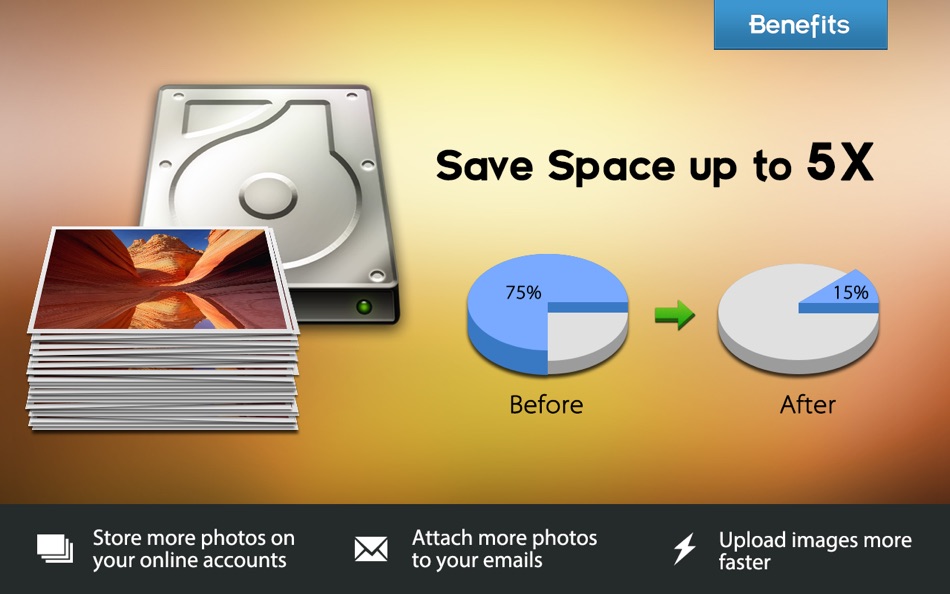
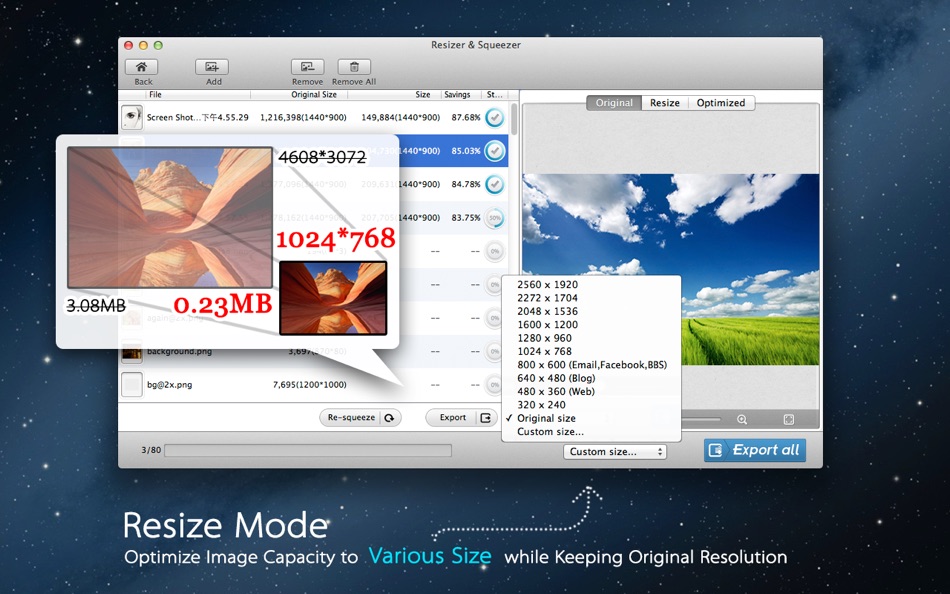
Photo Size Optimizer is a powerful photo resizer and optimizer. It optimizes photos by 80% ~ 20% while keeping original resolution, quality in png, jpg, gif formats. It makes it easy for you to store & transfer files without visible quality loss.
Photo Size Optimizer also supports batch resizing hundreds of photos quickly and easily with one click. It supports 70+ image formats for resizing:
JPG,BMP,PNG,GIF,PDF,PSD,PNT,RGB,ARW,BMPF,CUR,CRW,CR2,DCR,DNG,EPSF,EPSI,EPI,EPS,SR2,SRF,SRW,SGI,
EXR,EFX,ERF,FPX,FPIX,FAX,FFF,GIFF,G3,HDR,ICNS,ICO,JP2,JFX,JFAX,JPE,JFIF,JPF,MPO,MAC,TIF,XBM,3FR,8BPS
MRW,MOS,NRW,NEF,ORF,PICT,PIC,PCT,PS,PNTG,PNGF,PEF,QTIF,QTI,RAW,RAF,RW2,RWL,TRIC,TIFF,TGA,TARGA,
Key Features:
• 'Bulk' optimization with one-click.
• Easy management: When a folder is dragged into the application, Photo Size Optimizer will work on it immediately.
• Support 70 types of image formats for resizing.
• The program solicits whether to overwrite the original files while exporting.
• More choices:
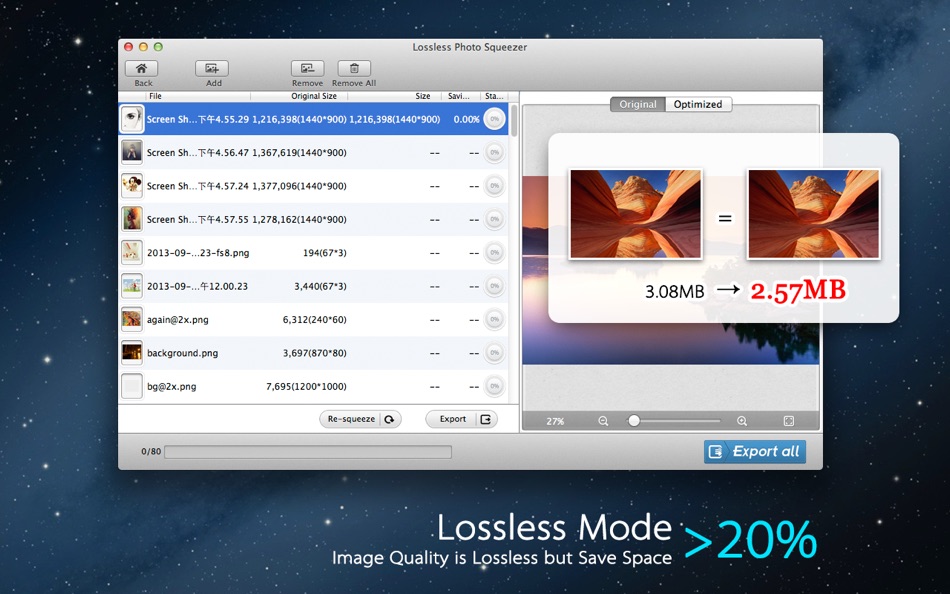
- Lossless mode will save more than 20% space. Lossless mode compresses and reduces large JPG, PNG, GIF (still & animated) images significantly but keep the original resolution, quality.
- Lossy mode will save more than 50% space with minor quality loss.
With Photo Size Optimizer, you can save huge space and share full-resolution photos with your friends much faster. Download it Now!
Feedback:
Any suggestion will be appreciated, support email: market@effectmatrix.com
Ad
ภาพหน้าจอ


ประวัติราคา
- วันนี้: ฟรี
- ต่ำสุด: ฟรี
- มากที่สุด: $14.99
ติดตามราคา
มีอะไรใหม่
- เวอร์ชัน: 1.70
- อัปเดต:
- New feature: The program solicits whether to overwrite the original files while exporting.
Major bugs were fixed:
1.The filename extension after saving may disaccord with that of original.
2.The capital file format .JPG was tampered into lowercase .jpg without any hint.
3.The dimensionality remains unchanged while resizing.
4.The result of resizing lacks conformity with what was set.
5.The interface will not response if a folder is being create while exporting.
ข้อมูลเพิ่มเติม
- วันที่วางจำหน่าย:
- หมวดหมู่:
macOS แอป›การถ่ายภาพ - ระบบปฏิบัติการ:
macOS,macOS 10.6 และสูงกว่า - ขนาด:
3 Mb - ภาษาที่สนับสนุน:
English - การจัดประเภทเนื้อหา:
4+ - Mac App Store คะแนนโดย:
0
 http://www.effectmatrix.com/mac-appstore/free-remove-background-from-image-for-mac.htm
ผู้พัฒนา
รายการ (2)
- Photo Size Optimizer


แต้มแล (22)
-

- 225 Study Planner
- +1
-
- 2,126 Lu Chin
- +1
-
- 225 Attila Szucs
- +1
-
- 920 thamer mohammed
- +1
-
- 4,522 Brain_vv
- +1
-
- 444 J-Unit
- +1


การจัดอันดับ (0)
0 ☹️
ความเห็น (0)
เป็นคนแรกที่แสดงความเห็น 🌟
«Photo Size Optimizer». แพลตฟอร์ม: macOS. หมวดหมู่: การถ่ายภาพ. ผู้พัฒนา: «秀英 朱». การเปิดตัวครั้งแรก: . อัปเดตล่าสุด: . ราคาปัจจุบัน: ฟรี. ชื่อนี้ยังไม่ได้รับการให้คะแนนหรือบทวิจารณ์บน AppAgg รายการ: สาธารณะ 2, ส่วนตัว 2. จุดที่ติดตาม: ยืนยันแล้ว 22, ทางอ้อม 0. ภาษาที่ใช้ได้: English. AppAgg ติดตามประวัติราคา การให้คะแนน และคำติชมของผู้ใช้ «Photo Size Optimizer». ส่วนลดและอัปเดตในอนาคต: RSS. AppAgg ไม่ได้โฮสต์แอปพลิเคชันหรือแจกจ่ายซอฟต์แวร์ เครื่องหมายการค้า โลโก้ และภาพหน้าจอทั้งหมดเป็นของเจ้าของที่เกี่ยวข้อง
Photo Size Optimizer URL แบบสั้น: คัดลอกแล้ว!- 🌟 แชร์
- Mac App Store
คล้ายกัน
-
- Photo Compressor: JPG PNG HEIC
- macOS แอป: การถ่ายภาพ โดย: Nikita Marchenko
- ฟรี
- รายการ: 0 + 0 0 0
- แต้มแล: 1 + 0 เวอร์ชัน: 1.0 Completely free Photo Compressor helps you compress photos and reduce photo size on Mac in seconds. Drag and drop images, choose the quality level, and export smaller files that still ... ⥯
-
- Photo Naminator
- macOS แอป: การถ่ายภาพ โดย: Bjoern Goerke
- * ฟรี
- รายการ: 0 + 1 0 0
- แต้มแล: 8 + 0 เวอร์ชัน: 2.26 Photo Naminator is a 3rd-party utility for Apple macOS that takes photo and video files as input (like JPEG, PNG, GIF or RAW format files) and renames their filenames based on metadata ⥯
-
- Photo Editor for Seedream
- macOS แอป: การถ่ายภาพ โดย: Yasir Islam
- * ฟรี
- รายการ: 0 + 0 0 0
- แต้มแล: 0 + 0 เวอร์ชัน: 1.3 Photo Editor for Seedream is an all-in-one AI photo editing app that turns your imagination into art. Create stunning visuals with Text to Image or transform existing photos using ... ⥯
-
- Photo Strip for Mac OS X
- macOS แอป: การถ่ายภาพ โดย: Andre Yonadam
- $0.99
- รายการ: 0 + 0 0 0
- แต้มแล: 0 + 0 เวอร์ชัน: 1.0 Photo Strip is a super fun and easy-to-use photography app that returns your photos just as if you were in a photo booth. The drag and drop interface is super easy to use and makes ... ⥯
-
- Photo Pixel Filter
- macOS แอป: การถ่ายภาพ โดย: Jan Nutbroek
- ฟรี
- รายการ: 0 + 2 0 0
- แต้มแล: 11 + 0 เวอร์ชัน: 1.9 Unleash Your Creativity with Our User-Friendly Photo Editing App! Master the art of photo editing with ease using our intuitive application, designed to eliminate the learning curve. ... ⥯
-
- Photo Distributor M
- macOS แอป: การถ่ายภาพ โดย: Pekka Leppanen
- $6.99
- รายการ: 0 + 0 0 0
- แต้มแล: 1 + 0 เวอร์ชัน: 2.0.1 Perfecting photographs requires adapting them to the viewing situation: scaling them for the viewing or printing device and setting optimal sharpening based on the expected viewing ... ⥯
-
- Photo Compressor
- macOS แอป: การถ่ายภาพ โดย: Ruchira Ramesh
- $4.99
- รายการ: 0 + 0 0 0
- แต้มแล: 0 + 0 เวอร์ชัน: 12.2 Compress JPG, PNG & HEIC photos and reduce them to size of your choice.You could either use Lossless method, Lossy method or just set what size you want.For example, if there is a ... ⥯
-
- Photo Watermark Plus
- macOS แอป: การถ่ายภาพ โดย: 颖淑 唐
- $3.99
- รายการ: 0 + 0 0 0
- แต้มแล: 0 + 0 เวอร์ชัน: 1.2 Give your photo to add multiple images (LOGO) and text watermarks, QRCode watermark ,and you can set the rotation angle, opacity, shadow, adjust up and down the hierarchy of each ... ⥯
-
- Photo Flipbook Studio
- macOS แอป: การถ่ายภาพ โดย: Solaz Dazen srl
- $14.99
- รายการ: 0 + 0 0 0
- แต้มแล: 0 + 0 เวอร์ชัน: 1.7.2 Create your own flipbooks with ease! This software takes your chosen photos of pdfs and generates a beautiful HTML flipbook that you can publish online or view on your computer or ... ⥯
-
- Photo Date Editor+
- macOS แอป: การถ่ายภาพ โดย: Don Miller
- $4.99
- รายการ: 0 + 0 0 0
- แต้มแล: 0 + 0 เวอร์ชัน: 1.1 Simply, with Photo Date Editor+, you can edit photos with often random or meaningless dates to the actual dates when the photos were taken. That means you can search or sort those ... ⥯
-
- Photo Print
- macOS แอป: การถ่ายภาพ โดย: Brendan Murphy
- $19.99
- รายการ: 0 + 0 0 0
- แต้มแล: 0 + 0 เวอร์ชัน: 4.1.0 The fastest way to format and print your pictures! Photo Print is an application designed to transform your photos into print. Photo Print is as simple as drag and drop. You drop in a ... ⥯
-
- Photo Organizer - Sort photos
- macOS แอป: การถ่ายภาพ โดย: Giuseppe Cigala
- $3.99
- รายการ: 0 + 0 0 0
- แต้มแล: 0 + 0 เวอร์ชัน: 1.9 It happens to everyone not being able to find a photo because it was saved with a random name and an incremental counter (eg IMG_1234) and not remembering exactly when it was taken. ... ⥯
- ใหม่
- Photo Developer
- macOS แอป: การถ่ายภาพ โดย: Andre Berg-Stølen
- $29.99
- รายการ: 0 + 0 0 0
- แต้มแล: 0 + 0 เวอร์ชัน: 1.1 After twenty years with a market-leading tool, I had opinions about how a RAW editor should work. So I built one. No catalog, no import step, no subscription. Open a file, develop it, ... ⥯
-
- Photo Editor
- macOS แอป: การถ่ายภาพ โดย: Codeway
- * ฟรี
- รายการ: 0 + 0 0 0
- แต้มแล: 0 + 0 เวอร์ชัน: 1.1 Fotoris AI Photo Editor is your ultimate creative powerhouse packed with advanced AI tools to transform any photo into something extraordinary. Create, design, edit, and imagine ... ⥯