
Ulubione
Wybierz nazwę, która będzie wyświetlana w menu ulubionych.
Gotowe!
| Programista: | Charlie Monroe Software, s.r.o. (6) | ||
| Cena: | $14.99 | ||
| Rankingi: | 5 (1) | ||
| Komentarze: | 0 Opublikuj komentarz | ||
| Listy: | 2 + 2 | ||
| Punkty: | 5 + 0 ¡ | ||
| Mac App Store | |||
Opis

Video, audio and image files come in many different kinds and shapes, but sometimes you need a specific format since your iPad or DVD player won't play that video. That's what Permute is for!
Here are some key features:
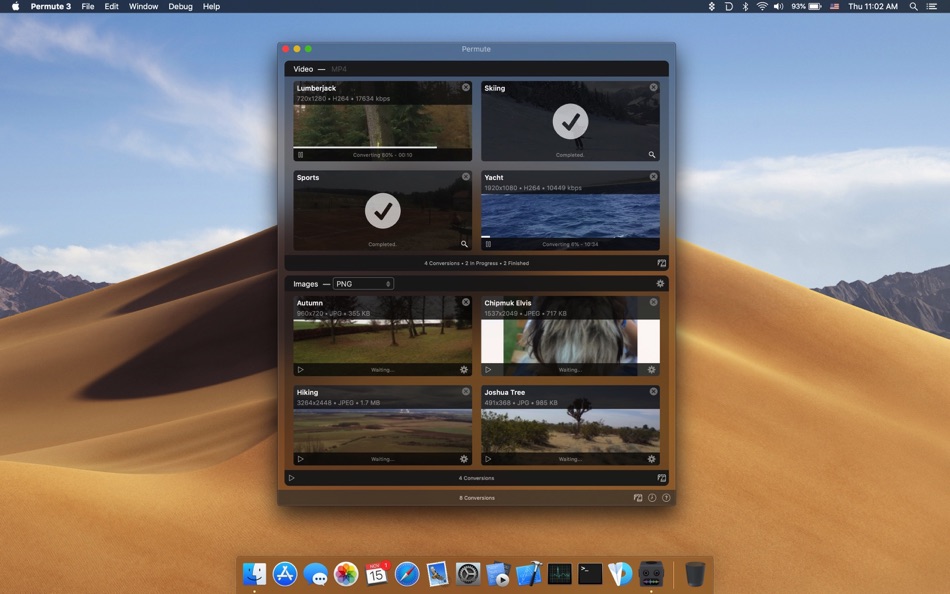
- Beautiful UI - See what you are converting. Permute includes icon view that allows you to see thumbnails of whatever you are working with.
- Easy to Use - What could be easier? Drag & drop a file, select target format and go. That easy!
- Insanely Fast - Permute can utilize as much of your computer as possible to get stuff done ASAP.
- Versatile - Videos, audio, images - Permute can handle it all. Want to create a DVD? No problem, Permute can do that too. With Permute 3.2 or later, you can also convert images into text!
- Customizations - Customize the presets, or just that particular conversion. Increase volume, rotate video, change its resolution, flip it and so on!
Ad
Zrzuty ekranu




Historia cen
- Dziś: $14.99
- Minimalna: $9.99
- Maksymalna: $14.99
Monitoruj ceny
Dodatkowe informacje
- Data wydania:
- Kategoria:
macOS Aplikacje›Fotografia - System operacyjny:
macOS,macOS 11.0 i nowsze - Rozmiar:
58 Mb - Obsługiwany język:
Afrikaans,Arabic,Belarusian,Bengali,Chinese,Czech,Dutch,English,French,German,Hindi,Italian,Japanese,Korean,Persian,Polish,Portuguese,Russian,Slovak,Spanish,Swedish,Ukrainian - Ocena treści:
4+ - Mac App Store Ocena:
0 - Witryna internetowa:
 https://software.charliemonroe.net/permute/
Programista
- Charlie Monroe Software, s.r.o.
- Platformy: iOS Aplikacje (2) macOS Aplikacje (4)
- Listy: 2 + 2
- Punkty: 5 + 0 ¡
- Rankingi: 5 (1)
- Komentarze: 0
- Zniżki: 0
- Filmy: 0
- RSS: Subskrybuj
Listy (2)
- Permute 3


Punkty (5)
-

- 1 leo leo
- +1
-
- 200 Rashad Mohammed bakar
- +1
-
- 1 朱图梦
- +1
-
- 1,121 m374
- +1



Rankingi (1)

Komentarze (0)
Skomentuj jako pierwszy 🌟
«Permute 3». Platforma: macOS. Kategoria: Fotografia. Deweloper: «Charlie Monroe Software, s.r.o.». Pierwsze wydanie: . Ostatnia aktualizacja: . Aktualna cena: $14.99. Najniższa zarejestrowana cena: $9.99 (). Najwyższa odnotowana cena: $14.99 (). Ocena AppAgg: 5 / 5. Głosy: 1. Listy: publiczne 2, prywatne 2. Śledzone punkty: potwierdzone 5, pośrednie 0. Dostępne języki: Afrikaans, Arabic, Belarusian, Bengali, Chinese, Czech, Dutch, English, French, German, Hindi, Italian, Japanese, Korean, Persian, Polish, Portuguese, Russian, Slovak, Spanish, Swedish, Ukrainian. AppAgg śledzi historię cen, oceny i opinie użytkowników «Permute 3». Śledź przyszłe rabaty i aktualizacje za pośrednictwem RSS. AppAgg nie hostuje aplikacji ani nie dystrybuuje oprogramowania. Wszystkie znaki towarowe, logo i zrzuty ekranu należą do ich odpowiednich właścicieli.
Permute 3 Krótki URL: Skopiowano!- 🌟 Udostępnij
- Mac App Store
Podobne
- -100%
- After Focus - Photo Background Blur Bokeh Effects
- macOS Aplikacje: Fotografia Przez: 秀英 朱
- ▼ Bezpłatny
$2.99-100% - Listy: 0 + 1 0 0
- Punkty: 32 + 0 Wersja: 1.5.5 On Sale. Original $29.99. Don't forget to download "Super PhotoCut" - A great photo background eraser. 50% OFF! After Focus professionally adds focus and depth to your photos without ... ⥯
-
- Intelligent Scissors - Remove Unwanted Object from Photo and Resize Image
- macOS Aplikacje: Fotografia Przez: effectmatrix
- Bezpłatny
- Listy: 1 + 2 0 0
- Punkty: 23 + 0 Wersja: 1.1.0 Don't forget to download "Super PhotoCut" which magically cut out object from photo. 50% OFF! Intelligent Scissors is an easy-to-use image editor to remove unwanted objects from your ... ⥯
-
- Hot Viewer
- macOS Aplikacje: Fotografia Przez: Jupiter Valley LLC
- Bezpłatny
- Listy: 1 + 2 0 0
- Punkty: 16 + 0 Wersja: 1.6.1 Hot Viewer is keyboard and mouse controlled viewer intended to make viewing of files easy. Inspired by good ol' Irfan view it uses simply shortcuts: - space to move to next file in ... ⥯
- -100%
- UMediaPlayer
- macOS Aplikacje: Fotografia Przez: 齐 张
- ▼ Bezpłatny
$4.99-100% - Listy: 0 + 1 0 0
- Punkty: 15 + 0 Wersja: 3.0.2 'UMediaPlayer' is a pure, high-performance player software for developers that supports common audio and video files. While providing everyone with a smooth and comfortable viewing ... ⥯
-
- Movavi Screen Recorder
- macOS Aplikacje: Fotografia Przez: Movavi Emea LLC
- * Bezpłatny
- Listy: 0 + 1 0 0
- Punkty: 13 + 0 Wersja: 24.7.1 Record any screen action you want with our handy app Movavi Screen Recorder! Capture video of your display and grab sound. Add a personal touch with webcam overlays. Engage your ... ⥯
-
- Minitube for YouTube
- macOS Aplikacje: Fotografia Przez: Flavio Tordini
- * Bezpłatny
- Listy: 0 + 1 0 0
- Punkty: 13 + 0 Wersja: 4.0.3 Minitube is a lightweight and elegant YouTube application for your Mac. With Minitube you can watch YouTube videos in a new way: you type a keyword, Minitube gives you an endless video ⥯
-
- Magic Hider Lite
- macOS Aplikacje: Fotografia Przez: Pavel Kosykh
- * Bezpłatny
- Listy: 1 + 1 0 0
- Punkty: 13 + 0 Wersja: 1.4.2 New level of hiding of any part of an image, this "smart" application will automatically find parts to hide. Just choose what you need to filter - faces or text*, than drag and drop ... ⥯
-
- Photo Pixel Filter
- macOS Aplikacje: Fotografia Przez: Jan Nutbroek
- Bezpłatny
- Listy: 0 + 2 0 0
- Punkty: 11 + 0 Wersja: 1.9 Unleash Your Creativity with Our User-Friendly Photo Editing App! Master the art of photo editing with ease using our intuitive application, designed to eliminate the learning curve. ... ⥯
- -100%
- Normally
- macOS Aplikacje: Fotografia Przez: Gustav Gaidelevicius
- ▼ * Bezpłatny
$4.99-100% - Listy: 0 + 1 0 0
- Punkty: 11 + 0 Wersja: 2026.03.16 If you download videos, you know the problem: audio levels are all over the place. One file barely audible, the next painfully loud. Normally fixes this automatically. Point it at your ⥯
-
- Video Subtitler
- macOS Aplikacje: Fotografia Przez: Anand
- Bezpłatny
- Listy: 0 + 1 0 0
- Punkty: 10 + 0 Wersja: 3.0 Super simple to use. Just 3 steps: 1. Drag & Drop any video. 2. Add Subtitle(s). 3. Save Video. That s it! Two Modes. Switch between them just with a click of a button. Hard Subtitle ... ⥯