
| Programista: | Segev Sherry (3) | ||
| Cena: | $9.99 | ||
| Rankingi: | 0 | ||
| Opinie: | 0 Napisać recenzję | ||
| Komentarze: | 0 Opublikuj komentarz | ||
| Listy: | 2 + 0 | ||
| Punkty: | 6 + 0 ¡ | ||
| Mac App Store | |||
Opis

Just click your middle mouse button (or right Command key) and start typing the app name.
Type the first letter, middle letters, an acronym, or a similar app name.
You can also keep tapping the first letter to cycle through apps that start with it.
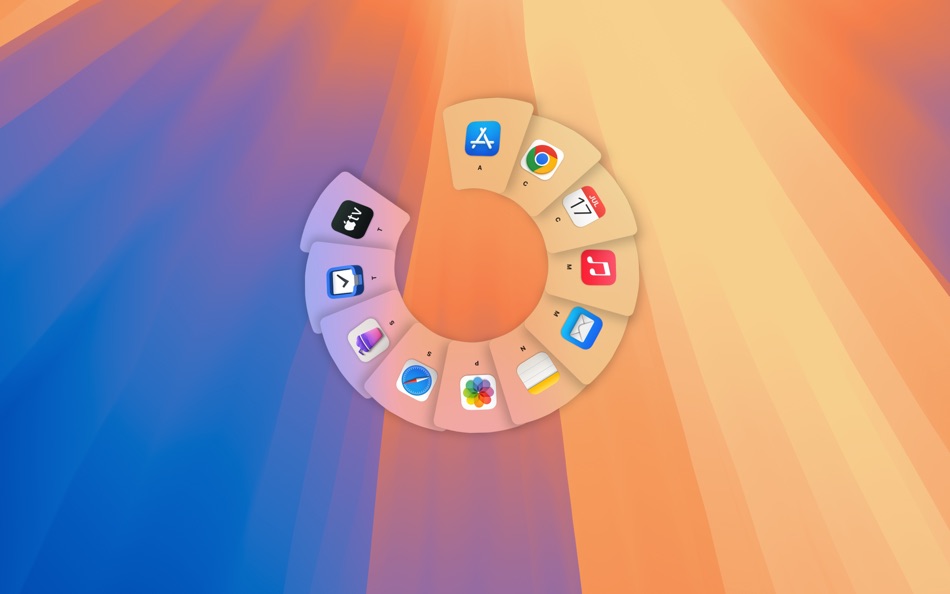
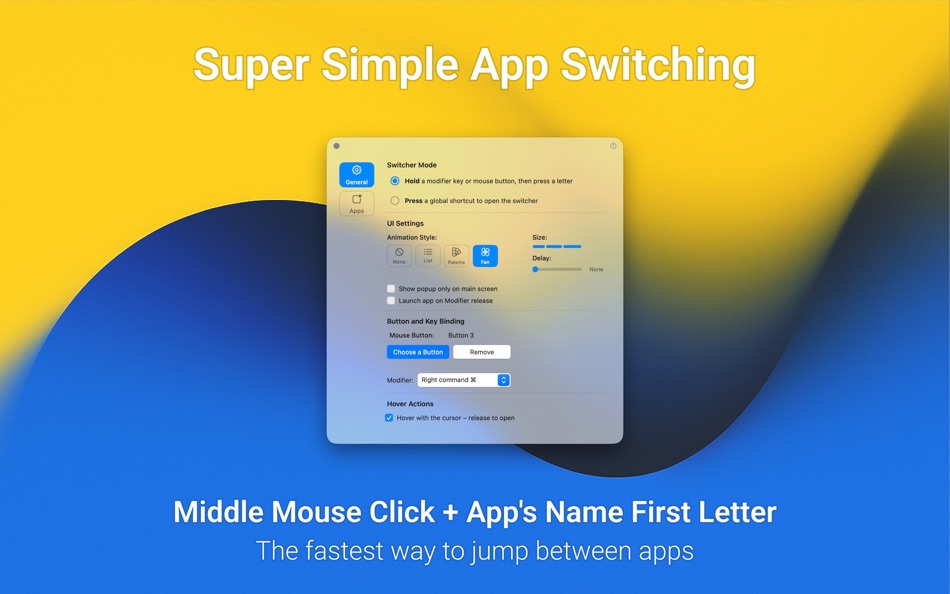
Prefer tapping over holding? No problem. With Press Mode, you can open Dory’s sleek UI using a global shortcut or a trackpad gesture.
No extra shortcuts.
No setup. Nothing to remember.
Dory works right out of the box - and over time, it learns which apps you use most and prioritizes them.
Simple. Fast. Effortless.
----
Key Features:
• Switch apps by typing the first letter, middle letters, acronyms, or similar app names.
• Keep tapping the same letter to cycle through matching apps
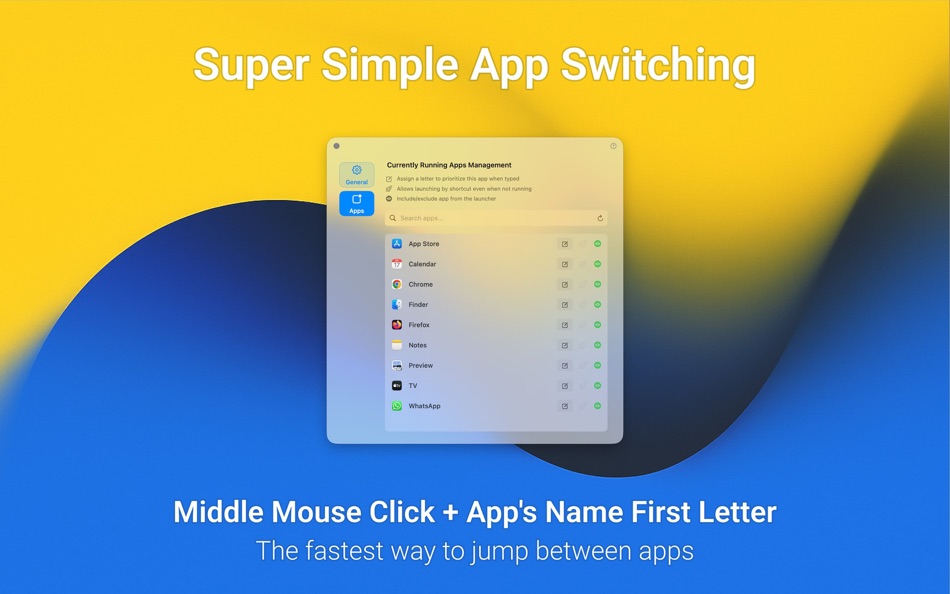
• Learns your habits and prioritizes the apps you use most
• Works instantly out of the box with no setup required
• Can be used as both an app switcher and an app launcher
Beautiful UI:
• Three beautiful UI modes to choose from
• Multiple size options for each UI mode
Trigger Dory using:
• A mouse button
• Modifier key hold
• Modifier tap or double tap
• Modifier plus key combination
• Hyperkey
• Trackpad gesture
Keyboard Layout Support:
• QWERTY
• Dvorak
• AZERTY
Fully localized into:
Spanish, Chinese (Simplified), French, German, Japanese, Portuguese, Korean, Italian, Russian, Dutch
Ad
Zrzuty ekranu


Historia cen
- Dziś: $9.99
- Minimalna: Bezpłatny
- Maksymalna: $9.99
Monitoruj ceny
Komentarze (0)
Skomentuj jako pierwszy 🌟
Programista
- Segev Sherry
- Platformy: macOS Aplikacje (3)
- Listy: 3 + 0
- Punkty: 7 + 0 ¡
- Rankingi: 0
- Opinie: 0
- Komentarze: 0
- Zniżki: 0
- Filmy: 0
- RSS: Subskrybuj
Punkty (6)
-

- 317 pantype
- +1
-
- 918 thamer mohammed
- +1
-
- 1 Tuấn Nguyễn Năng
- +1
-
- 1 Tejas Hiremath
- +1
-
- 3,660 Dragon
- +1


Rankingi (0)
0 ☹️
Listy (2)
- Dory - App Switcher


Opinie (0)
Bądź pierwszą osobą, która napisze recenzję 🌟
Dodatkowe informacje
- Wersja: 1.6.4
- Kategoria:
macOS Aplikacje›Produktywność - System operacyjny:
macOS,macOS 15.2 i nowsze - Rozmiar:
3 Mb - Obsługiwany język:
Chinese,Dutch,English,French,German,Italian,Japanese,Korean,Portuguese,Russian,Spanish - Ocena treści:
4+ - Mac App Store Ocena:
0 - Zaktualizowano:
- Data wydania:
Kontakty
- Witryna internetowa:
 https://segev.sh/dory/
«Dory - App Switcher». Platforma: macOS. Kategoria: Produktywność. Deweloper: «Segev Sherry». Pierwsze wydanie: . Ostatnia aktualizacja: . Aktualna cena: $9.99. Najniższa zarejestrowana cena: $0.00 (). Najwyższa odnotowana cena: $9.99 (). Ten tytuł nie otrzymał jeszcze ocen ani recenzji w serwisie AppAgg. Listy: publiczne 2, prywatne 0. Śledzone punkty: potwierdzone 6, pośrednie 0. Dostępne języki: Chinese, Dutch, English, French, German, Italian, Japanese, Korean, Portuguese, Russian, Spanish. AppAgg śledzi historię cen, oceny i opinie użytkowników «Dory - App Switcher». Śledź przyszłe rabaty i aktualizacje za pośrednictwem RSS. AppAgg nie hostuje aplikacji ani nie dystrybuuje oprogramowania. Wszystkie znaki towarowe, logo i zrzuty ekranu należą do ich odpowiednich właścicieli.
Dory - App Switcher Krótki URL: Skopiowano!- 🌟 Udostępnij
- Mac App Store
Ad
Podobne
-
- rcmd • App Switcher
- macOS Aplikacje: Produktywność Przez: THE LOW-TECH GUYS SRL
- Bezpłatny
- Listy: 5 + 3 Rankingi: 0 Opinie: 0
- Punkty: 12 + 0 0 Wersja: 2.7.0 Re-imagined Command-Tab. Switch apps instantly just by their first letter! Hold down the right side |⌘ command| and press the first letter of the app name to focus apps instantly The ... ⥯
-
- Smart Language Switcher
- macOS Aplikacje: Produktywność Przez: Ihor Prodan
- * Bezpłatny
- Listy: 1 + 1 Rankingi: 0 Opinie: 0
- Punkty: 4 + 0 0 Wersja: 3.14.0 Lang Switcher automatic keyboard layout switching on macOS Lang Switcher is an intelligent keyboard layout switcher for macOS that automatically detects the language you re typing in ... ⥯
-
- Quick Switcher-Set Resolution
- macOS Aplikacje: Produktywność Przez: 雅 田
- $1.99
- Listy: 1 + 1 Rankingi: 0 Opinie: 0
- Punkty: 10 + 0 0 Wersja: 1.4.2 Use Quick Switcher to hide desktop icons with one click, prevent computer from sleeping, modify computer screen resolution (support HIDPI (Retina) and non-HIPID (non-Retina) settings), ⥯
-
- Openly Pro - Browser Switcher
- macOS Aplikacje: Produktywność Przez: Fokusek Enterprise
- * Bezpłatny
- Listy: 1 + 1 Rankingi: 0 Opinie: 0
- Punkty: 1 + 0 0 Wersja: 1.3.4 Openly Pro - Browser Switcher is the perfect choice if you want to open a web page in a different browser, such as Chrome, Safari, Firefox, Brave and even Edge or other browsers. ... ⥯
-
- AltTab Switcher
- macOS Aplikacje: Produktywność Przez: 方成 印
- $2.99
- Listy: 0 + 0 Rankingi: 0 Opinie: 0
- Punkty: 0 + 0 0 Wersja: 1.3 AltTab Switcher - Bring Alt + Tab Window Switching to macOS AltTab Switcher brings the familiar and powerful Alt + Tab window switching experience from Windows to macOS. With just a ... ⥯
-
- App Switcher and Launcher
- macOS Aplikacje: Produktywność Przez: Wise Tech Labs Private Limited
- * Bezpłatny
- Listy: 0 + 0 Rankingi: 0 Opinie: 0
- Punkty: 1 + 0 0 Wersja: 1.8 App Switcher and Launcher Smarter app switching. Faster launching. Less frustration. Whether you're juggling 4 or 14 apps in your daily workflow, switching between them shouldn't slow ... ⥯
-
- Locale Switcher
- macOS Aplikacje: Produktywność Przez: 渊 周
- Bezpłatny
- Listy: 1 + 0 Rankingi: 0 Opinie: 0
- Punkty: 2 + 0 0 Wersja: 1.1.3 # 1 Click to Switch between Different Version of Web Pages # * https://support.apple.com/en-US/HT201150 https://support.apple.com/zh-CN/HT201150 * ... ⥯
-
- Launchy: App Launcher Switcher
- macOS Aplikacje: Produktywność Przez: Ivan Sapozhnik
- * Bezpłatny
- Listy: 0 + 0 Rankingi: 0 Opinie: 0
- Punkty: 4 + 0 0 Wersja: 1.3.0 Unlock a new level of productivity on macOS with Launchy! Launchy is the ultimate app launcher and switcher, combining speed, simplicity, and customization. Featuring a sleek radial ... ⥯
-
- Spatial Dock - App Switcher
- macOS Aplikacje: Produktywność Przez: LogiBeam
- $9.99
- Listy: 1 + 0 Rankingi: 0 Opinie: 0
- Punkty: 2 + 0 0 Wersja: 1.4.0 Spatial Dock is a keyboard-driven app switcher for Mac that turns your keyboard into an app map. Unlike Command-Tab or Mission Control, Spatial Dock keeps apps in fixed positions ... ⥯
-
- Tab Finder switcher for Safari
- macOS Aplikacje: Produktywność Przez: Oleh Kopyl
- $9.99
- Listy: 0 + 0 Rankingi: 0 Opinie: 0
- Punkty: 0 + 0 0 Wersja: 1.4.4 To try the app before buying search for "Tab Finder Lite for Safari" on the App Store. Search, navigate, and organize your browsing history faster than ever. This lightweight Safari ... ⥯
-
- Tab Application Switcher
- macOS Aplikacje: Produktywność Przez: BRONSON EDWARD MCKINLEY
- Bezpłatny
- Listy: 0 + 0 Rankingi: 0 Opinie: 0
- Punkty: 1 + 0 0 Wersja: 1.2.0 Switch between browser tabs using Alt+Tab, just like switching between apps on your computer. Features: Most Recently Used (MRU) tab ordering - your last tab is always one keystroke ... ⥯
-
- Language Switcher
- macOS Aplikacje: Produktywność Przez: Nikolay Kovalev
- Bezpłatny
- Listy: 0 + 0 Rankingi: 0 Opinie: 0
- Punkty: 0 + 0 0 Wersja: 0.6 If you press "Control + Shift" and any other key, input language will not be switched. It allows you to use shortcuts like "Control + Shift + Left Arrow" or "Control + Shift + Right ... ⥯
-
- LaunchPalette – App Switcher
- macOS Aplikacje: Produktywność Przez: Seungwoo Choe
- * Bezpłatny
- Listy: 0 + 3 Rankingi: 0 Opinie: 0
- Punkty: 13 + 0 0 Wersja: 1.13 Switch between apps and projects in milliseconds, without breaking your flow. LaunchPalette brings keyboard-first navigation to macOS, letting you instantly jump to any app, project, ... ⥯
-
- ProxyHo - Network Switcher
- macOS Aplikacje: Produktywność Przez: ScicoDream Network Technology Ltd
- $0.99
- Listy: 0 + 1 Rankingi: 0 Opinie: 0
- Punkty: 4 + 0 0 Wersja: 1.1.5 A simple app that help to manage the system proxy status on your Mac. This app allow you: 1. Change proxy settings easily and directly save into system. 2. Use Status bar to operate ... ⥯