
Zapisane
Wybierz nazwę, która będzie wyświetlana w menu Zapisane.
Gotowe!
| Programista: | Hypercritical LLC (3) | ||
| Cena: | $7.99 | ||
| Rankingi: | 0 | ||
| Komentarze: | 0 Opublikuj komentarz | ||
| Listy: | 3 + 1 | ||
| Punkty: | 5 + 0 ¡ | ||
| Mac App Store | |||
Opis

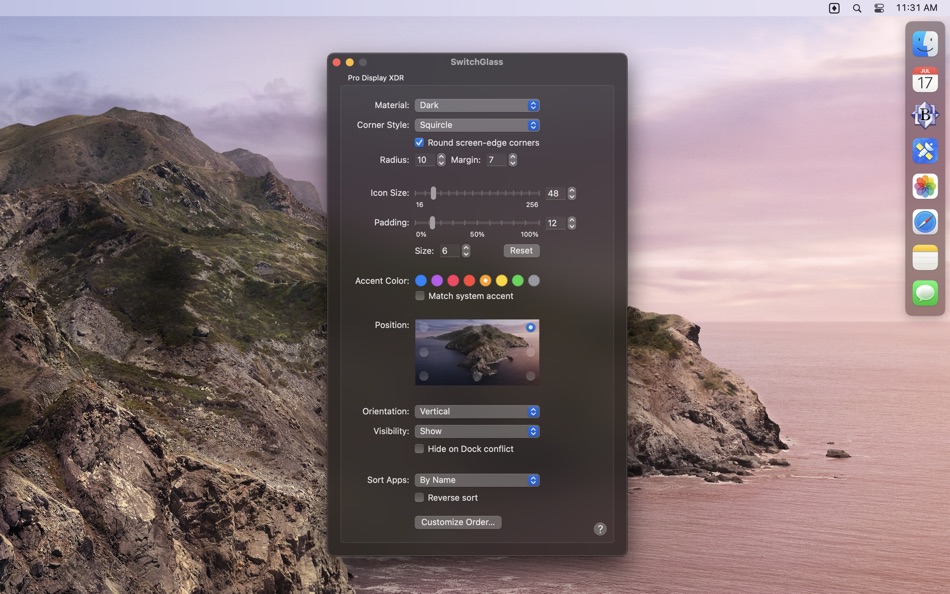
The following app switcher attributes can be customized individually for each attached display:
• Visibility - Permanently hide, show, or auto-hide the app switcher. Auto-hide keeps the app switcher hidden until the mouse cursor touches the region of the screen edge where the app switcher is positioned.
• Position - Move the app switcher to one of eight different positions on each screen.
• Orientation - Make the app switcher horizontal or vertical in a given position.
• Material - Change the appearance of the app switcher background to one of several possible choices (see screenshot above) including a mode where it automatically matches the system appearance (e.g, dark when dark mode is active, light otherwise).
• Corner Style and Radius - Choose from three corner styles: square, circle, or “squircle” (a “continuous” rounded corner style). The corner radius can also be adjusted.
• Icon Size - Adjust the size of app icons in the switcher from 16 to 256 points.
• Icon Padding - Adjust the padding between icons from 0% to 100% of the configured icon size.
• Margin - Adjust the amount of space around the app switcher.
• Hide on Dock conflict - Hide the app switcher when the macOS Dock occupies the same screen edge.
• App Sort Order - Sort apps by name or launch order, descending or ascending.
App order can also be customized for individual apps by setting fixed positions starting from either end of the app switcher.
Additionally, the following global settings may be customized:
• App Filtering - Show all apps or just those with windows on the current display.
• Menu Bar Icon - Choose from three possible menu bar icons.
• App Exclusions - Select apps that should never appear in the app switcher.
• Animation - Show animations during app state transitions.
• Tooltips - Show the app name when the pointer hovers over an app icon.
Here’s how the app switcher works in its default configuration:
• Click an app icon to bring all windows from that app to the front.
• Hold down the Shift key while clicking an app icon to bring just one window from that app to the front.
• Hold down the Option key while clicking an app icon to hide the current app before bringing the clicked app to the front. (Option-clicking the currently active app will hide it.)
• Hold down the Option and Shift keys while clicking an app icon to hide the current app before bringing just one window from the clicked app to the front. (Option-Shift-clicking the currently active app will hide it.)
• Right-click (or Control-click) an app icon to activate a context menu from which you can perform any of the supported actions (described below).
• Drag one or more files or folders onto an app icon to open those items with the app.
• Hold down the Command key while clicking on an app icon to reveal the app in the Finder.
The click and Shift-click actions are configurable. Each may be set to any one of these actions:
• Show All Windows - Activate an app and bring all its window to the front.
• Activate - Activate an app and bring a single window to the front.
• Reopen - Activate an app in a way that triggers its “reopen” handler. Apps can choose to do whatever they want in response to a “reopen” action, but most bring a single window to the front, opening a new window (or un-minimizing a window from the Dock) if none are open.
• Reopen and Show All - This is the same as “Reopen” except that SwitchGlass will also bring all the app’s windows to the front after sending the “reopen” action.
• Hide - Hide all windows belonging to an app.
For more information, click the SwitchGlass menu bar icon and choose “Help”, or visit https://hypercritical.co/switchglass/#help
Ad
Zrzuty ekranu


Historia cen
- Aktualna cena: $7.99
- Minimalna: $4.99
- Maksymalna: $7.99
Monitoruj ceny
Dodatkowe informacje
- Data wydania:
- Kategoria:
macOS Aplikacje›Produktywność - System operacyjny:
macOS,macOS 12.0 i nowsze - Rozmiar:
3 Mb - Obsługiwany język:
English - Ocena treści:
4+ - Mac App Store Ocena:
0
Nowości
- Wersja: 2.4.16
- Zaktualizowano:
- • Improved the wiggle animation when reordering apps.
• Minor stability improvements.
Programista
- Hypercritical LLC
- Platformy: macOS Aplikacje (3)
- Listy: 3 + 4
- Punkty: 7 + 0 ¡
- Rankingi: 0
- Komentarze: 0
- Zniżki: 0
- Filmy: 0
- RSS: Subskrybuj
Listy (3)
- SwitchGlass



Punkty (5)
-

- 534 MichaelTheGeek
- +1
-
- 3,762 Dragon
- +1
-
- 74 Alessandro
- +1
-
- 65 Kai Lee
- +1
-
- 35 aguano
- +1


Rankingi (0)
0 ☹️
Komentarze (0)
Skomentuj jako pierwszy 🌟
«SwitchGlass». Platforma: macOS. Kategoria: Produktywność. Deweloper: «Hypercritical LLC». Pierwsze wydanie: . Ostatnia aktualizacja: . Aktualna cena: $7.99. Najniższa zarejestrowana cena: $4.99 (). Najwyższa odnotowana cena: $7.99 (). Ten tytuł nie otrzymał jeszcze ocen ani recenzji w serwisie AppAgg. Listy: publiczne 3, prywatne 1. Śledzone punkty: potwierdzone 5, pośrednie 0. Dostępne języki: English. AppAgg śledzi historię cen, oceny i opinie użytkowników «SwitchGlass». Śledź przyszłe rabaty i aktualizacje za pośrednictwem RSS. AppAgg nie hostuje aplikacji ani nie dystrybuuje oprogramowania. Wszystkie znaki towarowe, logo i zrzuty ekranu należą do ich odpowiednich właścicieli.
SwitchGlass Krótki URL: Skopiowano!- 🌟 Udostępnij
- Mac App Store
Podobne
-
- Switch Browser: No copy-paste
- macOS Aplikacje: Produktywność Przez: Vladimir Kucherenko
- $0.99
- Listy: 0 0 0
- Punkty: 0 Wersja: 1.2.4 A Share Menu extension that opens any installed browser with the page you're currently looking at. No need to copy-paste urls anymore. ⥯
-
- Fast Switch - App Switcher
- macOS Aplikacje: Produktywność Przez: 波 宁
- $2.99
- Listy: 0 0 0
- Punkty: 0 Wersja: 1.1 "Fast Switch" helps you switch between apps Super Quick. Press the right Command key and the designated shortcut, and you can instantly switch to your target app, or even launch it. ... ⥯
- Nowa
- Auto Audio Switch
- macOS Aplikacje: Produktywność Przez: 子民 赵
- $9.99
- Listy: 0 0 0
- Punkty: 0 Wersja: 1.0.0 Auto Audio Switch is a lightweight menu bar utility for macOS that manages your microphone and speaker automatically. Set a preferred device and a fallback device for both input and ... ⥯
-
- BrowserHub - Switch Browser
- macOS Aplikacje: Produktywność Przez: 惠源 赵
- * Bezpłatny
- Listy: 0 0 0
- Punkty: 1 Wersja: 2.3.0 A powerful efficiency tool that can help you automatically assign the browser to open for different applications or links, achieving seamless switching, and it also supports hiding and ⥯
-
- Locale Switcher
- macOS Aplikacje: Produktywność Przez: 渊 周
- Bezpłatny
- Listy: 1 0 0
- Punkty: 2 Wersja: 1.1.3 # 1 Click to Switch between Different Version of Web Pages # * https://support.apple.com/en-US/HT201150 https://support.apple.com/zh-CN/HT201150 * ... ⥯
-
- LaunchPalette – App Switcher
- macOS Aplikacje: Produktywność Przez: Seungwoo Choe
- * Bezpłatny
- Listy: 0 + 3 0 0
- Punkty: 13 Wersja: 1.14.1 Switch between apps and projects in milliseconds, without breaking your flow. LaunchPalette brings keyboard-first navigation to macOS, letting you instantly jump to any app, project, ... ⥯
-
- DisplayProg
- macOS Aplikacje: Produktywność Przez: Balasubramanian Ramanathan
- $5.99
- Listy: 0 + 1 0 0
- Punkty: 2 Wersja: 1.2 * Switch resolution of all connected monitor with a click * Switch to Retina 2x resolution * Switch to Standard 1x Resolution * Launch at Login * Save and Restore the Resolution & ... ⥯
-
- Tab Application Switcher
- macOS Aplikacje: Produktywność Przez: BRONSON EDWARD MCKINLEY
- Bezpłatny
- Listy: 0 0 0
- Punkty: 1 Wersja: 1.2.3 Switch between browser tabs using Alt+Tab, just like switching between apps on your computer. Features: Most Recently Used (MRU) tab ordering - your last tab is always one keystroke ... ⥯
-
- SwitchBrowser
- macOS Aplikacje: Produktywność Przez: 承萍 马
- $0.99
- Listy: 0 0 0
- Punkty: 0 Wersja: 2.0.1 Switch default browser easily, enjoy rich customizable features, one-time payment, permanent access. ⥯
-
- Scrivener 3
- macOS Aplikacje: Produktywność Przez: Literature & Latte
- $59.99
- Listy: 3 + 11 0 0
- Punkty: 2 Wersja: 3.5.2 Typewriter. Corkboard. Scrapbook. Scrivener combines all the writing tools you need to craft your first draft, from nascent notion to final full stop. The biggest software advance for ... ⥯
-
- rcmd • App Switcher
- macOS Aplikacje: Produktywność Przez: THE LOW-TECH GUYS SRL
- Bezpłatny
- Listy: 5 + 3 0 0
- Punkty: 12 Wersja: 2.7.0 Re-imagined Command-Tab. Switch apps instantly just by their first letter! Hold down the right side |⌘ command| and press the first letter of the app name to focus apps instantly The ... ⥯
-
- HazeOver • Distraction Dimmer™
- macOS Aplikacje: Produktywność Przez: Maxim Ananov
- $4.99
- Listy: 6 + 2 0 0
- Punkty: 12 Wersja: 1.9.7 Too many windows to manage? Large display? Or getting lost in multiple monitors? HazeOver is for you! TRIAL version: HazeOver.com Turn distractions down and focus on your current task. ⥯
-
- Canary Mail App
- macOS Aplikacje: Produktywność Przez: Cartasec Pte. Ltd.
- * Bezpłatny
- Listy: 3 + 3 0 0
- Punkty: 13 Wersja: 5.19.4 The Best Email Client for Mac. Your AI Email Assistant. Canary can be as simple or as powerful as you want it to be: FOREVER FREE: Best for students & personal use Includes: **Unified ... ⥯
-
- Airmail - Lightning Fast Email
- macOS Aplikacje: Produktywność Przez: Bloop S.R.L.
- * Bezpłatny
- Listy: 4 + 5 0 0
- Punkty: 5 Wersja: 26.0.3 Apple Design Award 2017 Winner Airmail is a mail client designed with performance and intuitive interaction in mind optimized for macOS and iOS! Support for iCloud™, MS Exchange, ... ⥯