
| Programista: | 惠源 赵 (19) | ||
| Cena: | $6.99 | ||
| Rankingi: | 0 | ||
| Opinie: | 0 Napisać recenzję | ||
| Komentarze: | 0 Opublikuj komentarz | ||
| Listy: | 3 + 1 | ||
| Punkty: | 5 + 0 ¡ | ||
| Mac App Store | |||
Opis
Please note: This Pro version features the exact same core functionality as our free-to-download "MouseBoost" app.
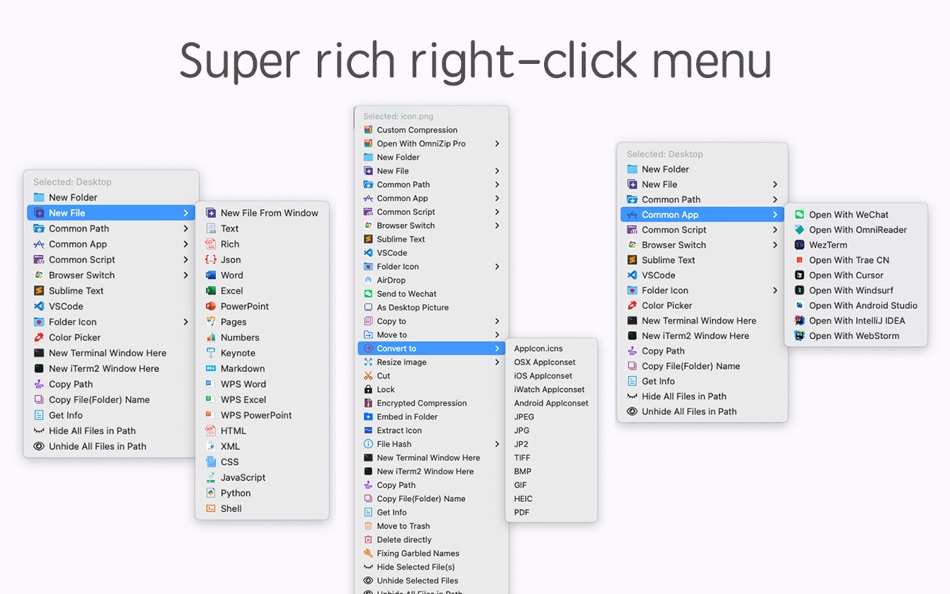
"MouseBoost Pro" packs over 30 handy utilities. With a right-click, you can access various features to boost your productivity. Personalize the right-click menu for your needs, whether you're a programmer, designer, or other. As a Mac user, this tool is a must-have.
***Key Features***
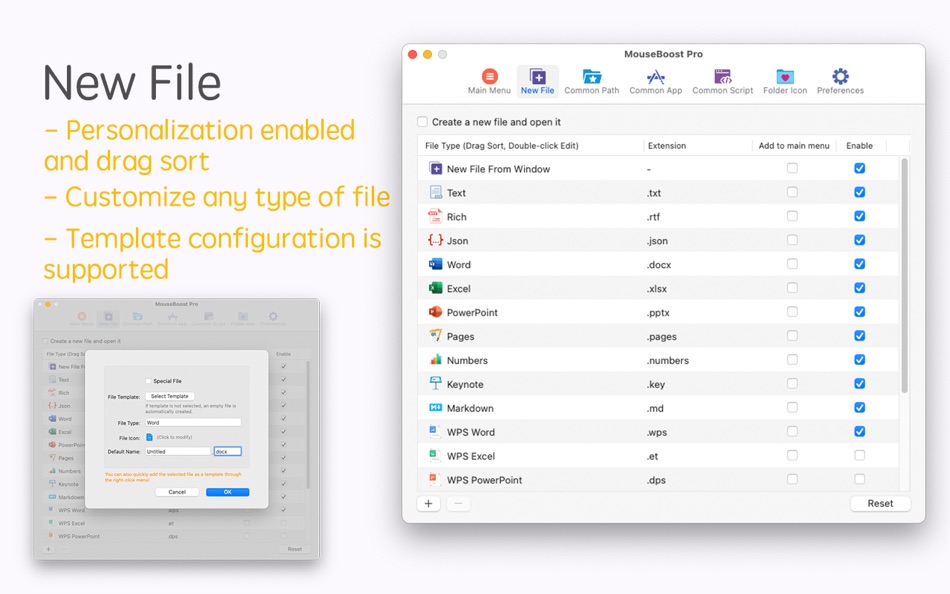
- File Creation: Quickly create custom files, including special types like .gitignore.
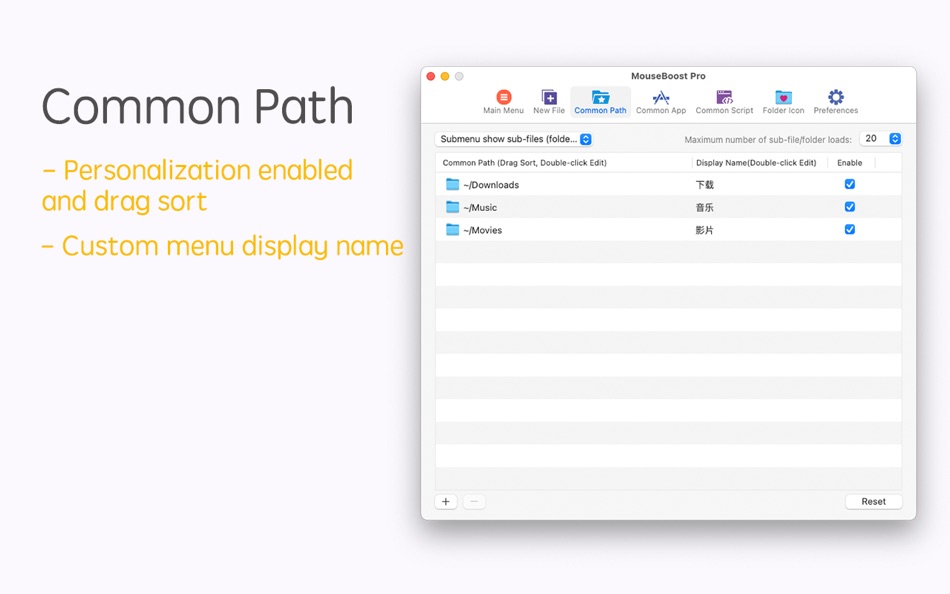
- Common Paths: Organize and quickly access your most-used directories and their sub-files.
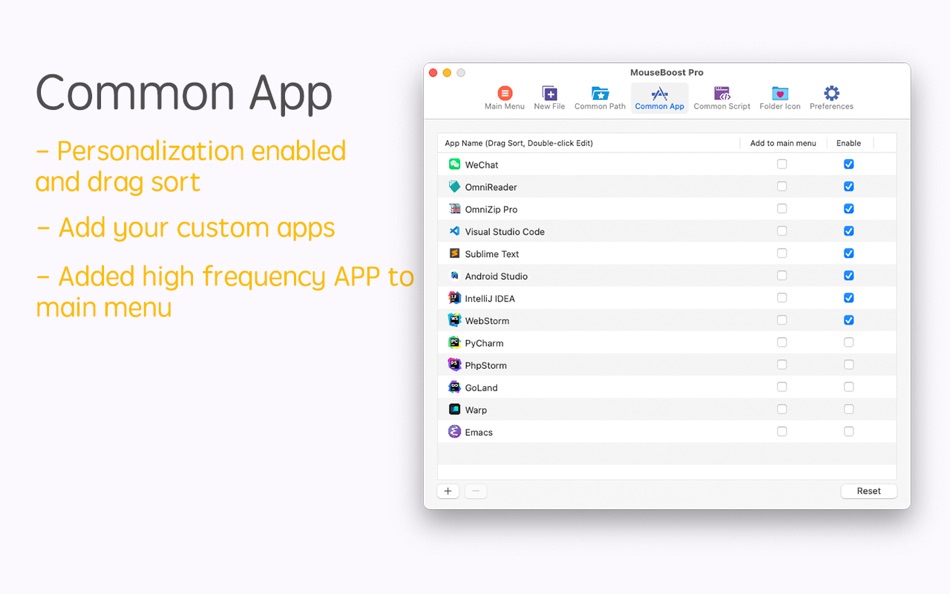
- App Shortcuts: Streamline your workflow by adding frequently used apps to the right-click menu.
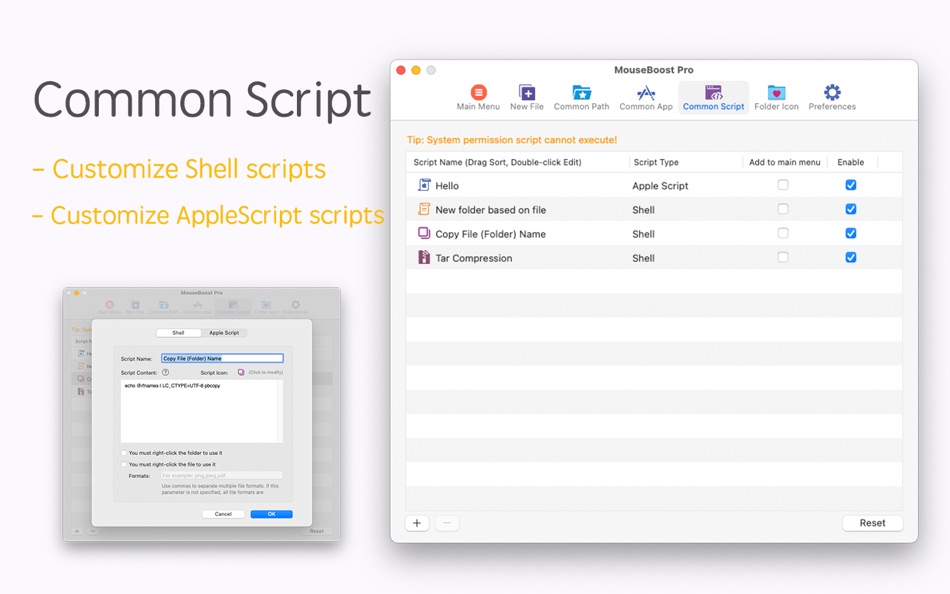
- Script Runner: Add custom scripts for tasks like file operations, enhancing efficiency.
- Hide/Show Files: Conceal private files for privacy or clean screenshots.
- File Locking: Secure files against accidental changes with a click.
- Color Picker: Snap and copy HEX/RGB values from your screen.
- File Management: Move, copy, and manage files with ease.
- Terminal Access: Open Terminal / iTerm2 / Ghostty/ cmux directly in the desired directory.
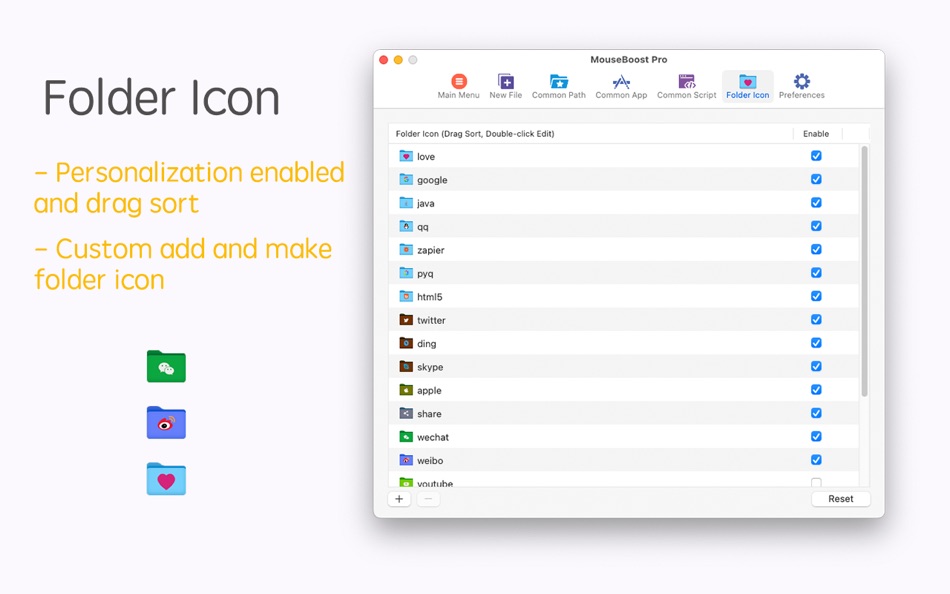
- Folder Icons: Personalize folder icons with various styles.
- Image Tools: Generate icons for multiple platforms and convert image formats.
- File Info: Obtain cryptographic hashes and other info for files.
- App Uninstallation: Uninstall an APP and all its associated resources and log files with one click.
- Send Files: Share files via air-drop or to WeChat.
- Advanced Features: Copy paths, force-delete files, and more.
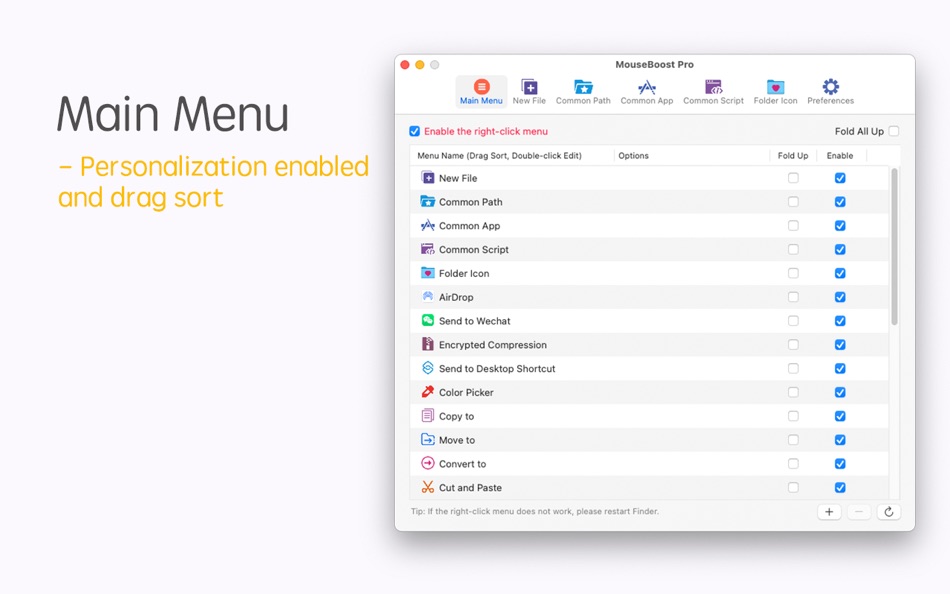
- Customization: Arrange the menu, disable unused options, and add preferred apps/files for a tailored experience.
For a small cost, enhance your work speed. Don't wait, get it now for instant benefits!
Troubleshooting:
- iTerm2 dual windows: Adjust preferences to restore only the hotkey window.
- Right-click issues: Restart Finder, toggle the MouseBoost extension, or adjust iCloud settings for macOS 14.
Reach us at gmshrekhelp@outlook.com for support.
Ad
Zrzuty ekranu
Historia cen
- Dziś: $6.99
- Minimalna: $0.99
- Maksymalna: $6.99
Monitoruj ceny
Nowości
- Wersja: 4.2.0
- Zaktualizowano:
- - Added: Common paths now support adding URLs.
- New menu: Capture to Clipboard, Screen Recording.
- New menu: Audio Recording, Video Recording (requires activation).
- New menu: cmux terminal (requires activation).
- Optimized the hiding of the main menu icon.
- Fixed some known issues.
Komentarze (0)
Skomentuj jako pierwszy 🌟
Programista
- 惠源 赵
- Platformy: macOS Aplikacje (19)
- Listy: 6 + 4
- Punkty: 50 + 0 ¡
- Rankingi: 0
- Opinie: 0
- Komentarze: 0
- Zniżki: 0
- Filmy: 0
- RSS: Subskrybuj
Punkty (5)
-

- 1,204 Anthony
- +1
-
- 664 IMO FUCASHI
- +1
-
- 3,028 바람처어럼
- +1
-
- 65 Kai Lee
- +1
-
- 48 Czak
- +1





Rankingi (0)
0 ☹️
Listy (3)
- MouseBoost Pro


Opinie (0)
Bądź pierwszą osobą, która napisze recenzję 🌟
Dodatkowe informacje
- Wersja: 4.2.0
- Kategoria:
macOS Aplikacje›Narzędzia - System operacyjny:
macOS,macOS 10.11 i nowsze - Rozmiar:
12 Mb - Obsługiwany język:
Arabic,Chinese,Danish,Dutch,English,French,German,Italian,Japanese,Korean,Malay,Polish,Portuguese,Russian,Spanish,Swedish,Thai,Turkish,Ukrainian - Ocena treści:
4+ - Mac App Store Ocena:
0 - Zaktualizowano:
- Data wydania:
Kontakty
- Witryna internetowa:
 https://www.shrekcc.top
«MouseBoost Pro». Platforma: macOS. Kategoria: Narzędzia. Deweloper: «惠源 赵». Pierwsze wydanie: . Ostatnia aktualizacja: . Aktualna cena: $6.99. Najniższa zarejestrowana cena: $0.99 (). Najwyższa odnotowana cena: $6.99 (). Ten tytuł nie otrzymał jeszcze ocen ani recenzji w serwisie AppAgg. Listy: publiczne 3, prywatne 1. Śledzone punkty: potwierdzone 5, pośrednie 0. Dostępne języki: Arabic, Chinese, Danish, Dutch, English, French, German, Italian, Japanese, Korean, Malay, Polish, Portuguese, Russian, Spanish, Swedish, Thai, Turkish, Ukrainian. AppAgg śledzi historię cen, oceny i opinie użytkowników «MouseBoost Pro». Śledź przyszłe rabaty i aktualizacje za pośrednictwem RSS. AppAgg nie hostuje aplikacji ani nie dystrybuuje oprogramowania. Wszystkie znaki towarowe, logo i zrzuty ekranu należą do ich odpowiednich właścicieli.
MouseBoost Pro Krótki URL: Skopiowano!- 🌟 Udostępnij
- Mac App Store
Ad
Podobne
-
- Mouse Aura
- macOS Aplikacje: Narzędzia Przez: Samuel Barney
- $2.99
- Listy: 0 + 0 Rankingi: 0 Opinie: 0
- Punkty: 0 + 0 0 Wersja: 1.0 Mouse Aura brings the magic of the aurora borealis to your Mac desktop. Simply shake your mouse to activate a beautiful, flowing trail of colorful particles that follow your cursor ... ⥯
-
- Mouse Jiggler – Mouse Mover
- macOS Aplikacje: Narzędzia Przez: Bohdan Bilous
- * Bezpłatny
- Listy: 0 + 2 Rankingi: 0 Opinie: 0
- Punkty: 8 + 0 0 Wersja: 2.7 Mouse Jiggler - Mouse Mover is a simple utility that generates subtle cursor movements to assist accessibility and interaction needs. It performs smoothly and efficiently without ... ⥯
-
- Mouse Insomnia
- macOS Aplikacje: Narzędzia Przez: Braden Aron Mc Corkle
- $0.99
- Listy: 0 + 0 Rankingi: 0 Opinie: 0
- Punkty: 0 + 0 0 Wersja: 1.1.0 Mouse Insomnia Keep your Mac awake with gentle, human-like mouse movements. Whether you re vibe-coding, running long simulations, or simply need your Mac to stay awake, Mouse Insomnia ... ⥯
-
- Mouse Smoothy
- macOS Aplikacje: Narzędzia Przez: Nha Ho
- * Bezpłatny
- Listy: 0 + 0 Rankingi: 0 Opinie: 0
- Punkty: 0 + 0 0 Wersja: 3.0 Mouse Smoothy makes your mouse scroll like Apple s Magic Mouse smooth, natural, and fluid. Works across all apps, including creative and editor tools Support for multi-monitor setups ... ⥯
-
- Mouse Snap Clicker
- macOS Aplikacje: Narzędzia Przez: 论 李
- $4.99
- Listy: 0 + 0 Rankingi: 0 Opinie: 0
- Punkty: 0 + 0 0 Wersja: 1.1.1 Mouse Snap Clicker Essential Mac auto clicker! Customize click intervals (hours/minutes/seconds/ms), select mouse button/type. Define precise positions via coordinates or screenshot. ... ⥯
-
- Mouse Gestures
- macOS Aplikacje: Narzędzia Przez: George MacKerron
- $1.99
- Listy: 0 + 1 Rankingi: 0 Opinie: 0
- Punkty: 1 + 0 0 Wersja: 1.1.1 Mouse Gestures is a tiny macOS menu-bar app. It enables simple mouse gestures for navigation. Mouse Gestures recognises two gestures. Hold the right mouse button and drag leftwards to ... ⥯
-
- Mouse Maestro
- macOS Aplikacje: Narzędzia Przez: Essam Abdelhady
- $0.99
- Listy: 0 + 0 Rankingi: 0 Opinie: 0
- Punkty: 0 + 0 0 Wersja: 1.1 Mouse Maestro - Automate Your Mac with Ease Streamline your workflow and reclaim your time with Mouse Maestro, the elegant automation tool for macOS. Transform repetitive tasks into ... ⥯
-
- Mouse Click Sound
- macOS Aplikacje: Narzędzia Przez: 方成 印
- $2.99
- Listy: 0 + 0 Rankingi: 0 Opinie: 0
- Punkty: 0 + 0 0 Wersja: 1.6 Mouse Click Sound - Add Feedback to Your Silent Mouse and Trackpad Mouse Click Sound enhances your macOS experience by providing audio feedback for every click. Whether you're using a ... ⥯
-
- Mouse Clicker & Shaker
- macOS Aplikacje: Narzędzia Przez: Wise Tech Labs Private Limited
- $7.99
- Listy: 0 + 1 Rankingi: 0 Opinie: 0
- Punkty: 5 + 0 0 Wersja: 2.3 We've all faced this: You're playing a game and you need to click a lot for taking some coins or for another game play. Or you have an app that functions with clicks and you need to do ⥯
-
- Mouse Wheel Scroll Volume
- macOS Aplikacje: Narzędzia Przez: 莎 蒋
- $2.99
- Listy: 0 + 0 Rankingi: 0 Opinie: 0
- Punkty: 0 + 0 0 Wersja: 1.3.0 MouseWheelScrollVolume is a lightweight system utility that lets you adjust macOS system volume by simply holding a modifier key and scrolling your mouse wheel. No need to switch apps ... ⥯
-
- Mouse++ & New File Menu
- macOS Aplikacje: Narzędzia Przez: 威 蒋
- * Bezpłatny
- Listy: 2 + 1 Rankingi: 0 Opinie: 0
- Punkty: 3 + 0 0 Wersja: 3.4 You can directly create new documents and other content on the desktop. It has rich functions to make your right-click menu even more powerful. The deeply rooted interactive design ... ⥯
-
- Mouse skin effects
- macOS Aplikacje: Narzędzia Przez: 济南飞鸟文化传媒有限公司
- Bezpłatny
- Listy: 0 + 0 Rankingi: 0 Opinie: 0
- Punkty: 1 + 0 0 Wersja: 1.0.2 Unleash your mouse's potential and light up every click with CursorPlus! CursorPlus is a mouse enhancement tool meticulously crafted for macOS users, poised to revolutionize how you ... ⥯
-
- Mouse Hider
- macOS Aplikacje: Narzędzia Przez: SopoNext
- $0.99
- Listy: 0 + 0 Rankingi: 0 Opinie: 0
- Punkty: 1 + 0 0 Wersja: 3.5.1 The unique App for hide the cursor on the Mac App Store, and the best app in absolute! Mouse Hider makes the presence of the mouse cursor on the monitor less intrusive. Thanks to Mouse ⥯
-
- Mouse Click Pro
- macOS Aplikacje: Narzędzia Przez: 春生 熊
- $2.99
- Listy: 0 + 0 Rankingi: 0 Opinie: 0
- Punkty: 3 + 0 0 Wersja: 1.0.4 "Auto click and combo functions and features" Top speed up to 80+ clicks per second Support fixed position click Support the definition of left and right mouse buttons Support timer ... ⥯